.jpg?w=1920&h=1280)
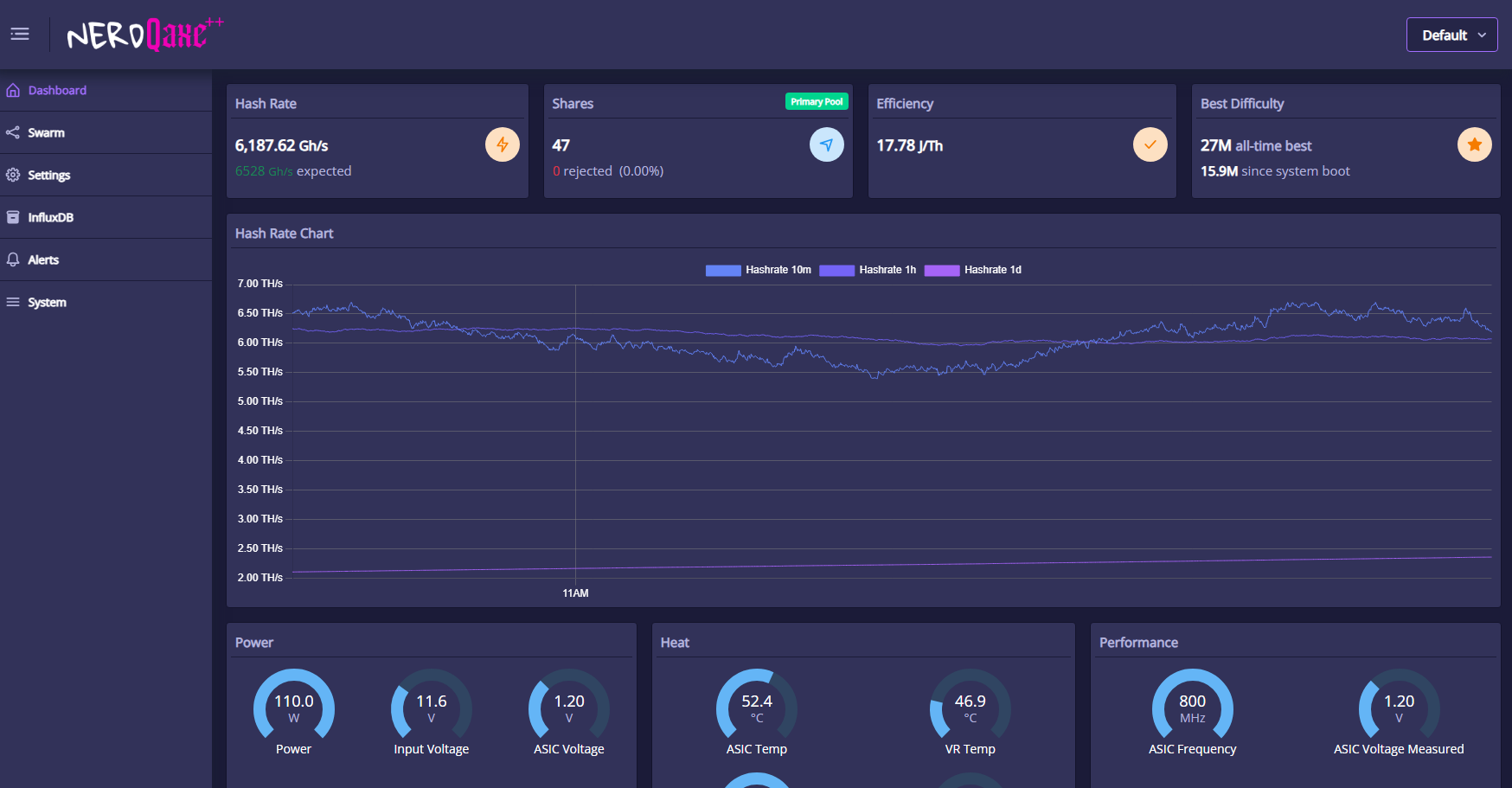
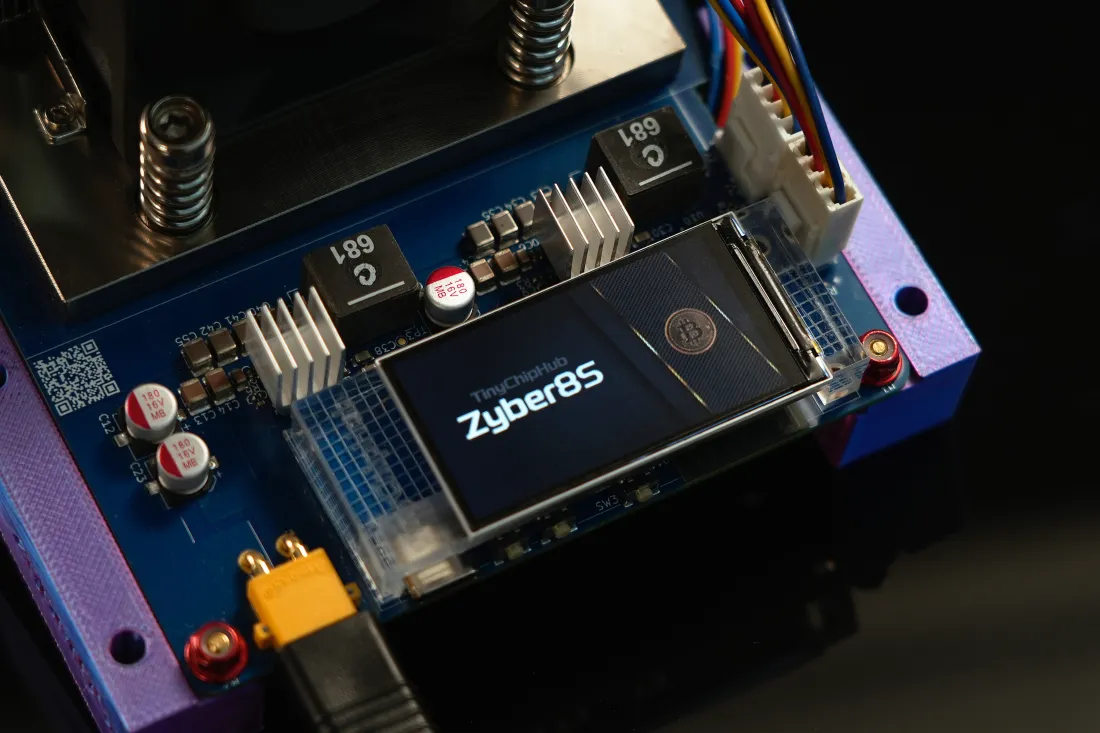
NerdQaxe++ Remastered is an ASIC miner with a hashrate of 5.2 Th+/s ±10% , power consumption of approximately 80W (12V/10A), equipped with 4 BM1370 ASIC chips, specifically designed for home Solo Miner Bitcoin mining in 2026!According to the latest internal pool overclocking mode tests from TinyChipHub Labs in 2026, this NerdMiner's sustained hashrate (24-hour average) is approximately 6 TH/s, while power consumption remains at 100 ~110 W, with a peak hashrate reaching6.83 TH/s.
This guide will walk you through safety precautions, assembly steps, setup procedures, and other knowledge. Just follow the guide, and you can start mining within minutes. If you need help at any step, please contact TinyChipHub through these channels: Discord, X, or technical support email.
*Note: This guide applies only to all NerdQaxe++ units with open-source firmware and AxeOS, sold by TinyChipHub. If your device runs other firmware versions or operating systems, please contact the corresponding retailer for the correct instructions.
1. NerdQaxe++ Safety✅
1.1 Power/Fire Safety
Quick Look: ⚠️ Power Error → Encrypted Device Damage + Fire
-
Dedicated Power Supply: Use only the experimental-grade power supply provided by TinyChipHub. Third-party power supplies may cause device damage or fire risk.
-
Voltage Verification: When using a third-party power supply, strictly verify the output voltage. Incorrect voltage can damage the device and cause a fire.
-
Circuit Load: Do not share the same power outlet with multiple high-power appliances to avoid circuit breaker trips or electrical fire hazards.
-
Power Off Before Operation: Before maintenance, adjustment, or touching the inside of the miner, unplug the power cord first.
1.2 Cooling/Emergency Handling
-
Dry and Ventilated: The device must be placed in a dry, well-ventilated area. Do not use in enclosed spaces.
-
Overheat Protection: The ASIC chip operating temperature is 50–70°C. The device has built-in overheat protection (triggers "overheat mode").
- Emergency Handling: If smoke or a burning smell appears, cut power immediately, and never use water to extinguish an electrical fire.
1.3 Network/Physical Standards
Quick Look:⚠️ Non-compliant Operation → Warranty Void + Personal Injury/Fire
- Network Security: Use a private Wi-Fi with a hidden SSID and set a strong password to prevent device hijacking.
- Physical Protection: Handle with care, avoid dropping. Store in a place inaccessible to children and pets.
- Standard Operation: Emphasize power must be disconnected before maintenance. Do not modify internal components (voids warranty) or insert fingers to touch the fan.
-
Environmentally Friendly Disposal: Follow local e-waste recycling regulations, prioritize recycling components through formal channels.
2. NerdQaxe++ Assembly Process
2.1 Stand Mounting
Align the four mounting holes on the back of the NerdQaxe++ PCB board with the four screw holes on the included lucky stand (with built-in 8010 fan). Carefully lower the circuit board vertically and tighten the screws into the corresponding screw holes. To ensure the device is secure, you may need to apply even force during installation.
*Pro Tip: Start with the bottom two pins first, then work your way up.
2.2 Fan Installation (If Purchased)
When installing the Thermalright TL-9015R Fan + heatsink module, ensure the airflow direction is towards the NerdQaxe++ motherboard. Use the included screws and a slender Phillips screwdriver. Insert the screws from one side of the fan only, then tighten until they thread into the stand and the fan is firmly secured.
*Note: For specific operations, you can follow the video step by step. Refer to the video below for the NerdQaxe++ assembly/disassembly process.
3. NerdQaxe++ Setup Process
3.1 Plug and Play => Startup
Please use the provided 12V 10A experimental-grade power adapter to power the NerdQaxe++ Remastered! Since each encrypted miner is tested for quality and safety before shipping, it can basically be used directly as long as it's connected to WiFi and plugged into power. Others only require you to set up personal information. Don't forget, please ensure stable power supply 24/7.
3.2 Identifying Wi-Fi Signal
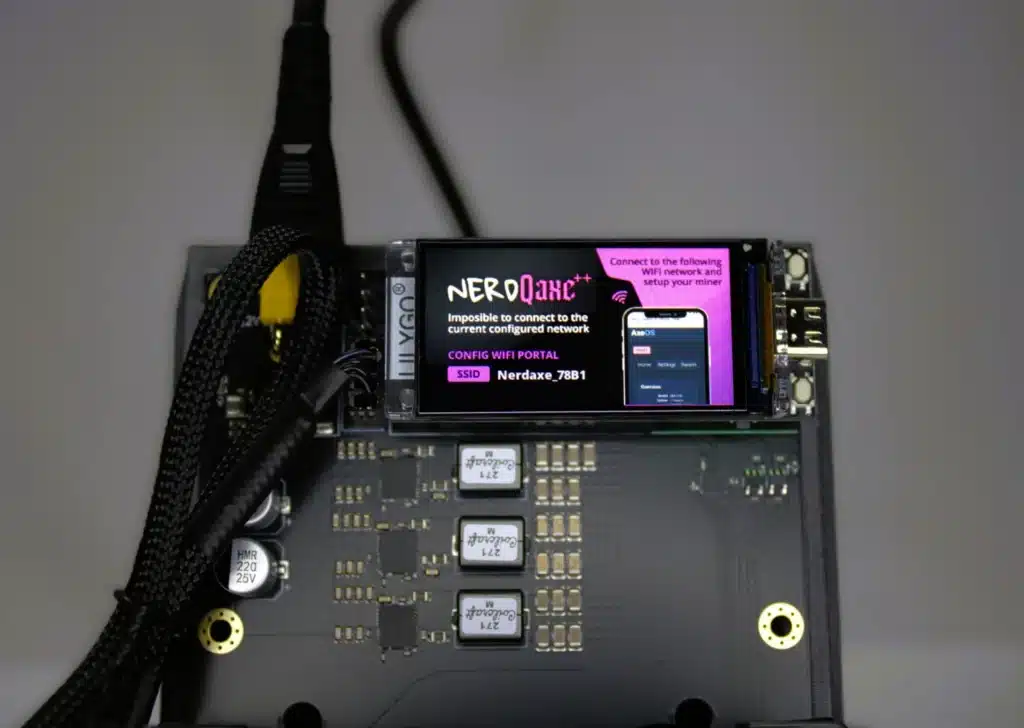
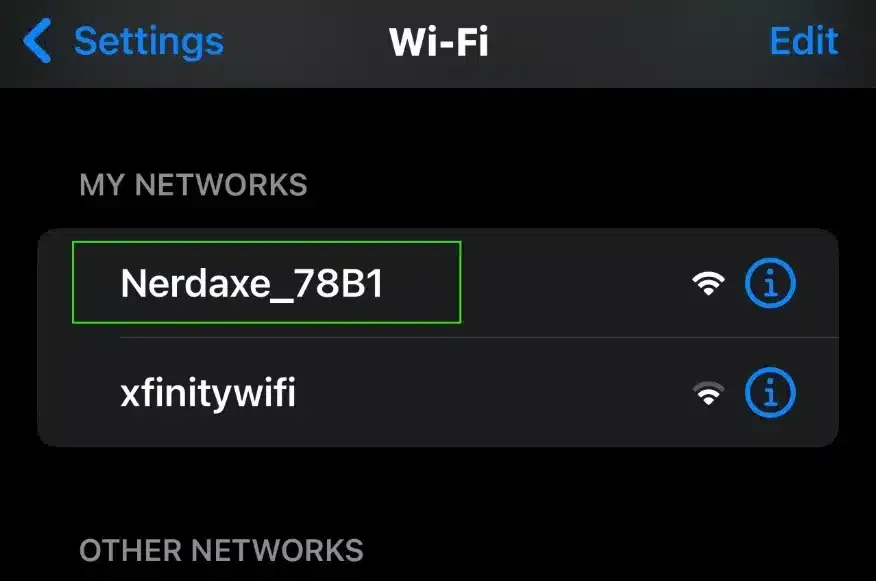
After powering on, the device will broadcast a Wi-Fi signal (SSID). Please scan for this signal using your phone, laptop, or desktop computer. (Example: Nerdaxe_78B1)
3.3 Locating Your NerdQaxe++
Look for the device's SSID in the Wi-Fi settings of your phone, laptop, or desktop. The SSID displayed on the screen should match the one in the settings. Connect to this SSID.
*Note: If you are using a desktop or laptop, do not select "Connect automatically" when choosing the device SSID. Otherwise, it may cause Wi-Fi connection issues with the device.
3.4 Accessing NerdQaxe++ Backend
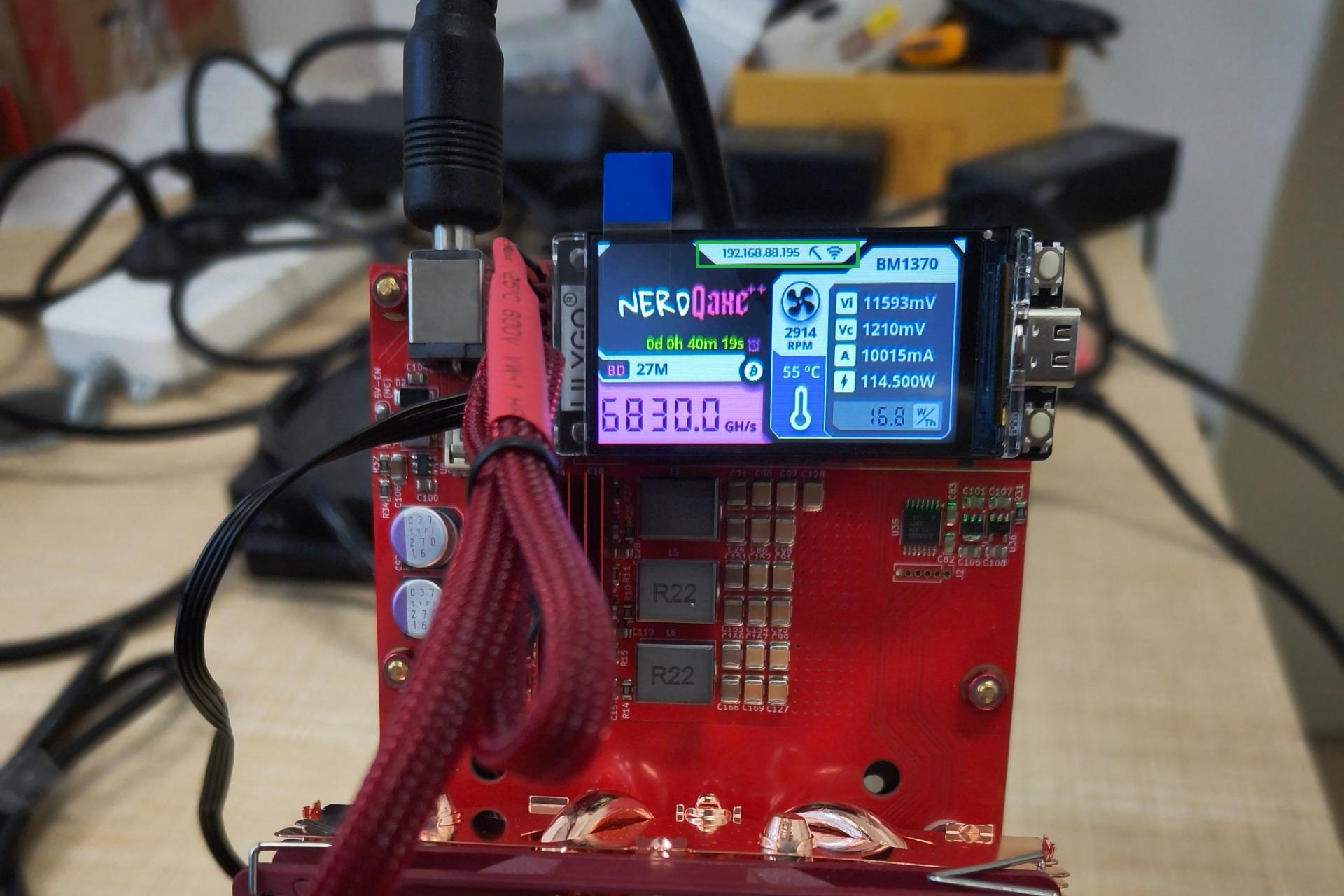
After connecting to the device's SSID WiFi, the NerdQaxe++ screen should pop up with the device's IP address. (For example, default IP address 192.168.88.195)
*Note: If you are using a router with network protection (e.g., ASUS), you must enter the router settings and disable the network protection function. The network protection function may prevent your device from connecting to Wi-Fi.
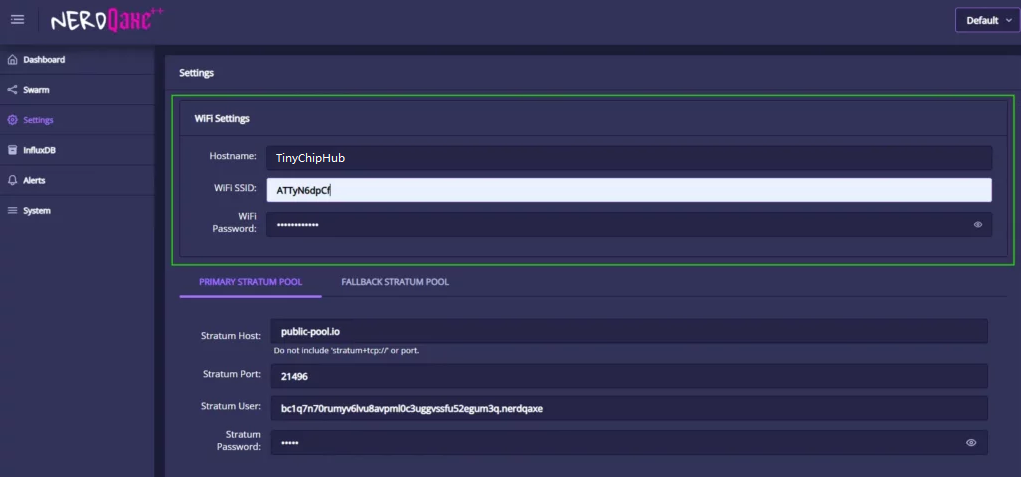
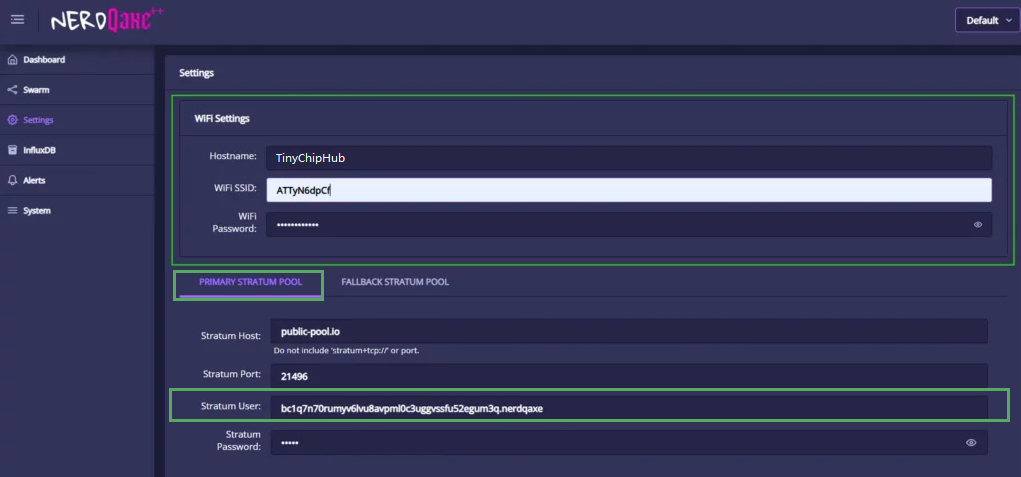
3.5 Configuring Wi-Fi Settings
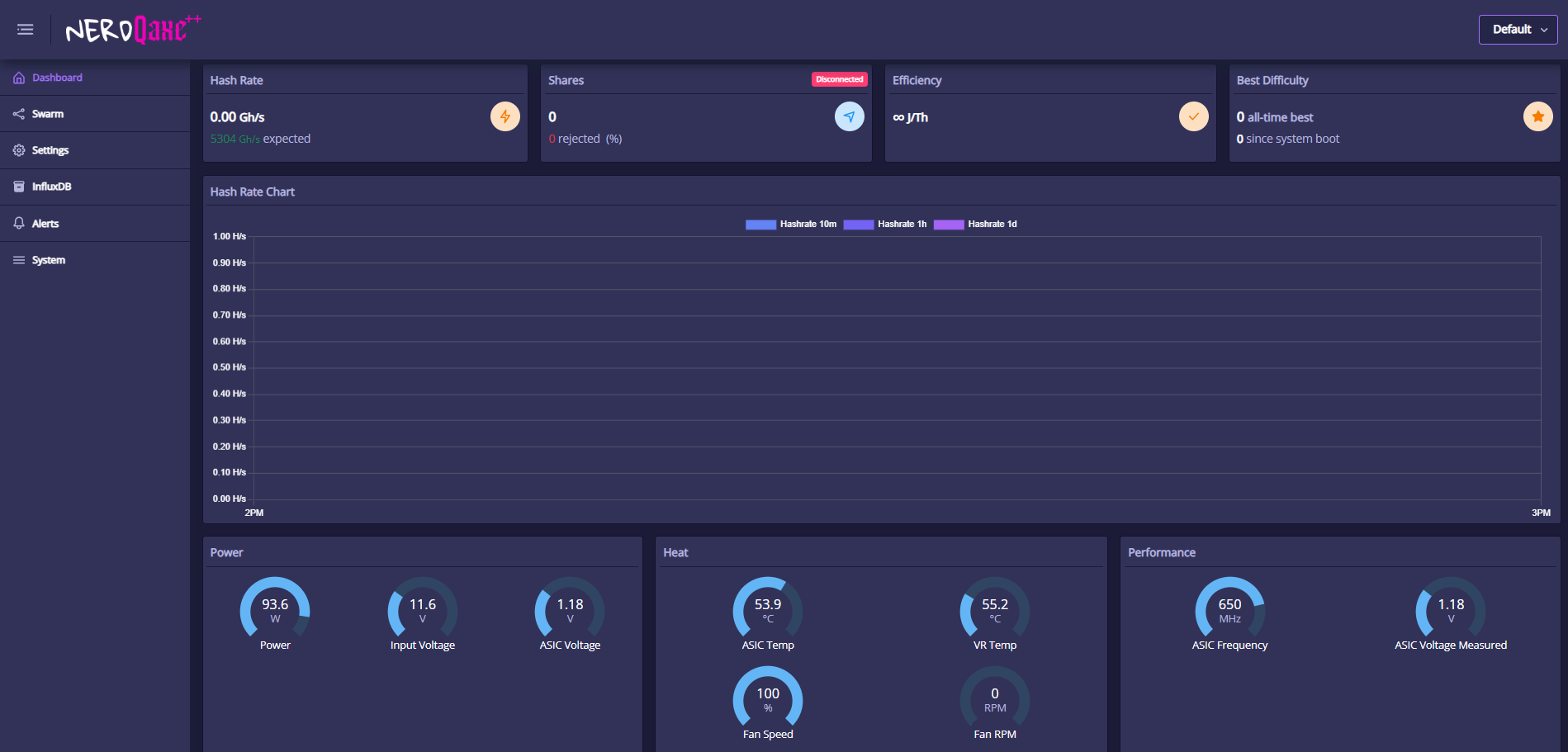
- Navigate to the Settings tab on the left
- Select the correct Wi-Fi network.
- Enter your Wi-Fi network password (case sensitivity and numbers are important).
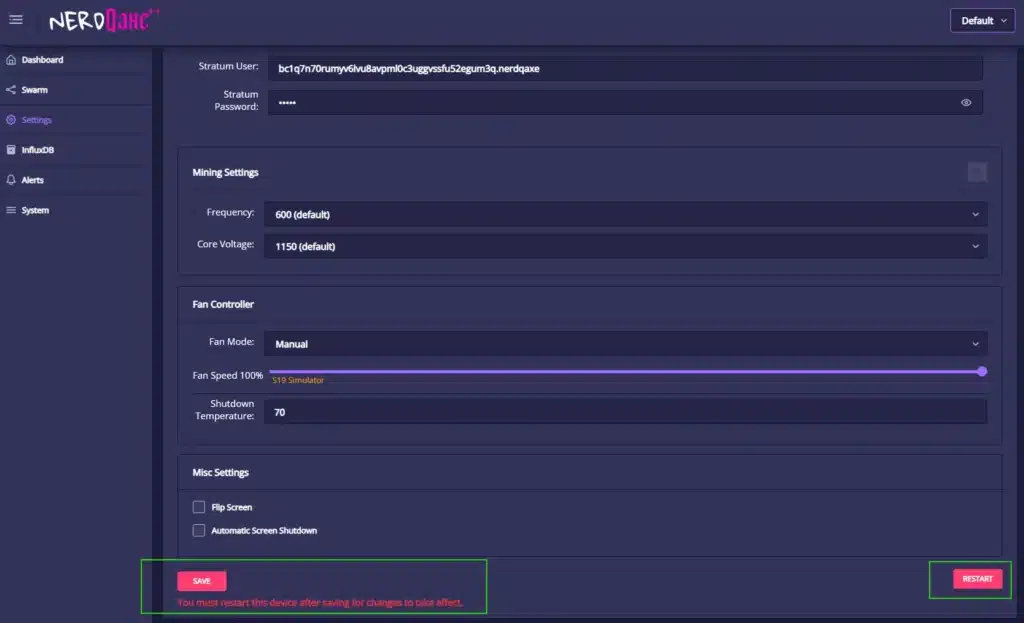
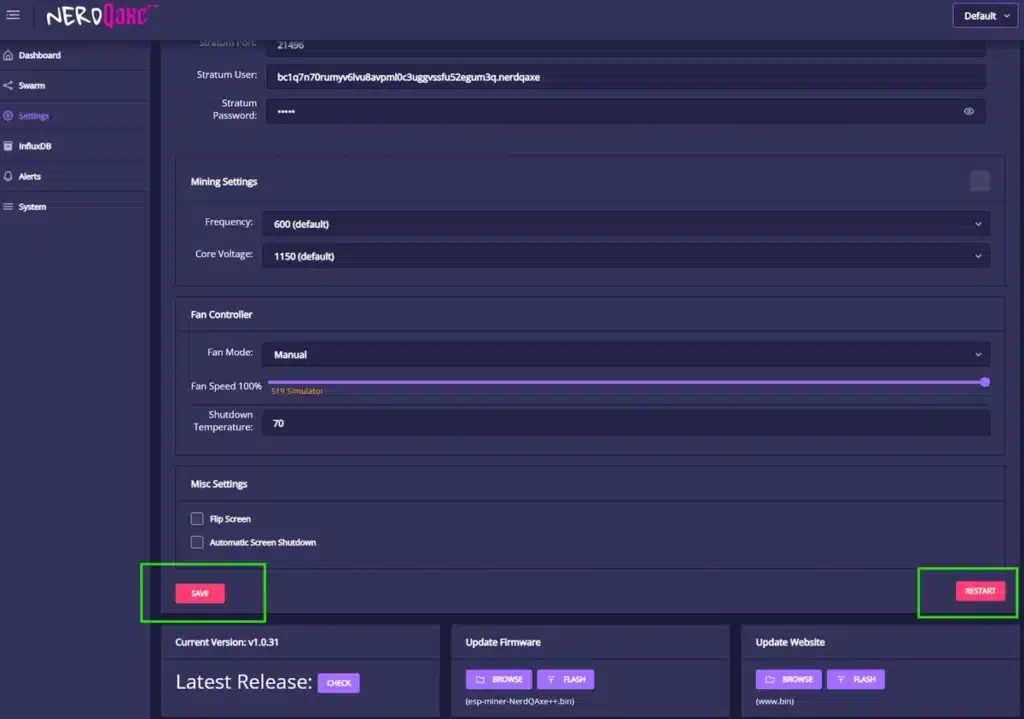
- Select"Save" to save your Wi-Fi credentials.
- Select "Restart" to reboot the device.
*Note: If your Wi-Fi credentials are entered incorrectly, your device will not be able to connect to the Wi-Fi network or will display "No Access Point Found". Please ensure correct letter case, all numbers/special characters are in the correct positions, and spaces are entered accurately.
3.6 Accessing Axe OS via IP Address
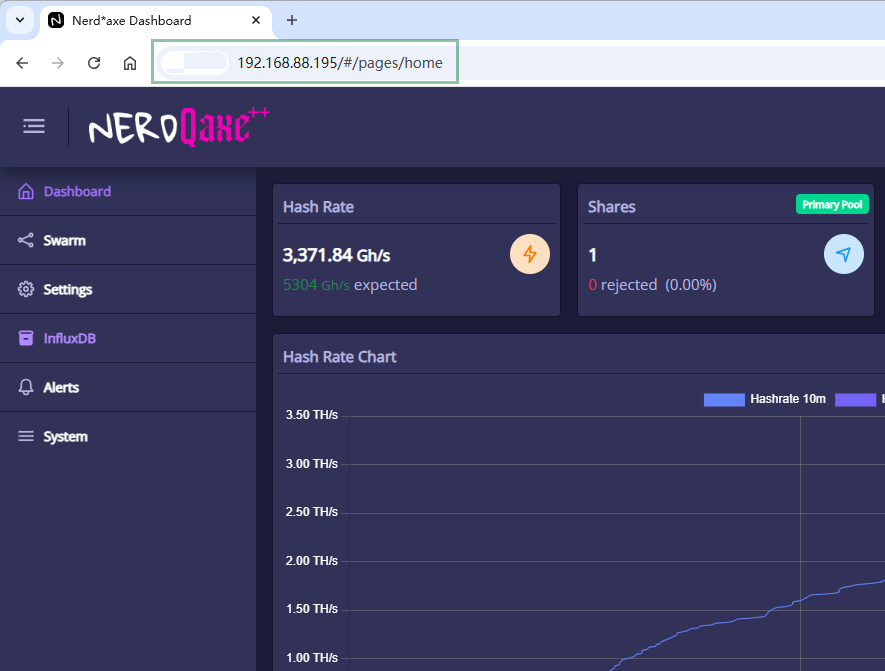
After connecting to your home Wi-Fi, the Nerdaxe Miner will display an IP address (generally does not change, basically the default IP address: 192.168.88.195). Use this IP address to access AxeOS in your browser. Make sure your computer or phone is connected to the same Wi-Fi network.
*Note: The Wi-Fi chip used in all Nerdaxe devices can only connect to 2.4GHz Wi-Fi signals. Most modern routers broadcast both 5.0GHz and 2.4GHz signals.
3.7 Connecting a Bitcoin Wallet to Your NerQaxe++
- In AxeOS, navigate to the "Settings" tab.
- Please enter your valid on-chain Bitcoin wallet address in the "Tier User" and "Alternate Tier User" fields.
- Click "Save and Restart" to apply the new wallet configuration.
*Note: If you do not enter a valid on-chain Bitcoin receiving address, your device will not function properly. Lightning Network addresses cannot be used for these fields.
When you reach this point, congratulations!!! You have successfully got the NerdQaxe++ Remastered running correctly✅.
You can monitor its performance, including hashrate and submitted shares, etc., by selecting the "Dashboard" tab in the device's operating system...
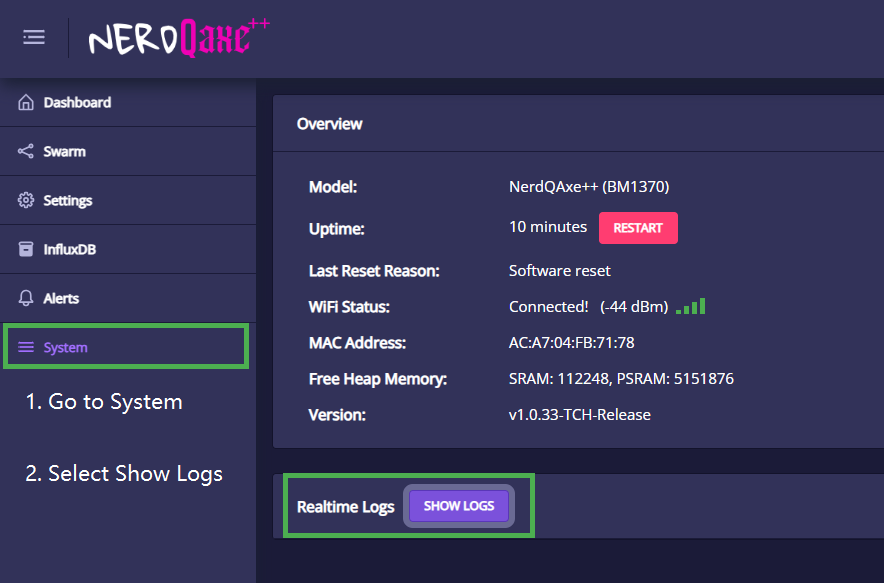
3.8 Fault Log Testing
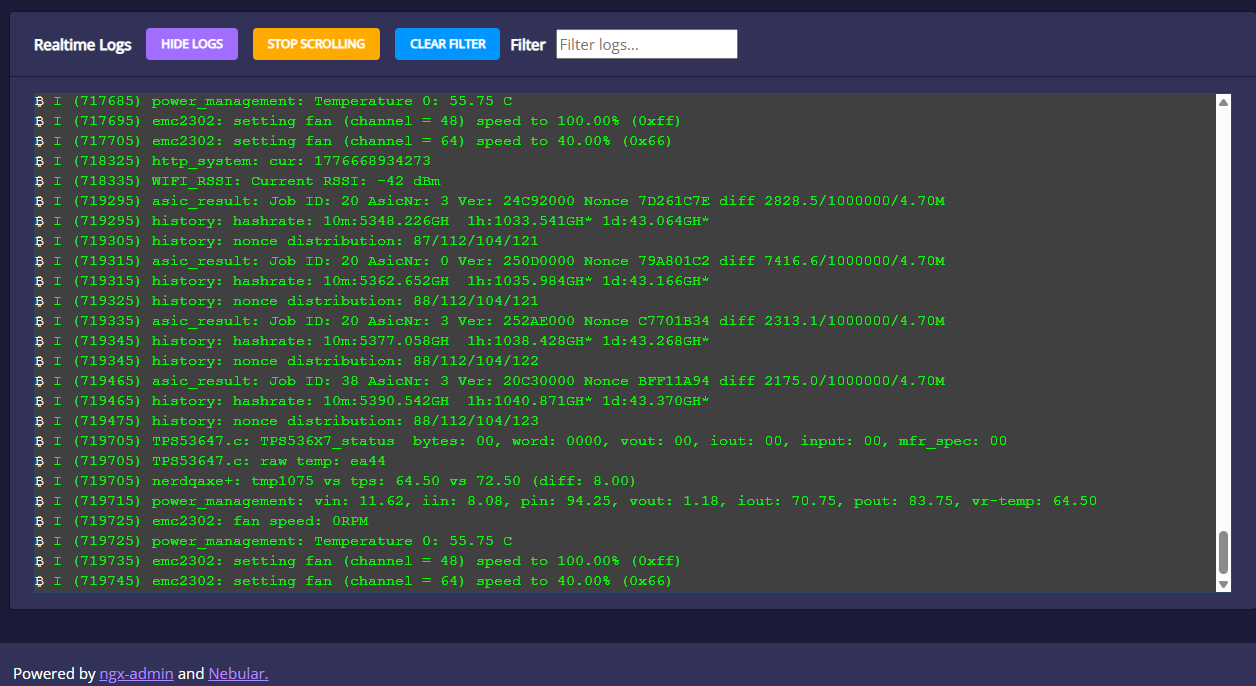
If you encounter issues such as abnormal miner hashrate, abnormal power consumption, etc., please follow the steps below to review first before contacting customer service Extract logs to help diagnose the problem!!!
a. Let the miner run for 2 minutes and then check the backend logs.
b. Copy and paste the complete log history into a .txt file, Notepad, or Word document.
c. If any problems or errors occur, send the file to TinyChipHub for review, and customer service will answer your miner's operational issues!!!
Note: Device logs help technicians pinpoint errors and guide quick and accurate problem resolution.
3.9 Reset, Upgrade, Flashing Instructions
Before performing related operations, TinChipHub reminds you:
The main power input interface for the NerdQaxe++ is a round interface (if you want to purchase your own, please refer to these parameters: 12V 10A round interface, 5.5 * 2.5mm, DC male plug power cable). You should power it with a suitable 12V DC power supply. The USB-C interface next to the screen is only for data transmission, such as firmware flashing. Even though the board can theoretically draw a small amount of power from the USB interface in certain modes, this is not a recommended or supported way of operation, and the power provided this way is insufficient for normal hashing. Always use the USB-C interface as a data and maintenance interface, and the round interface as the power input interface.
Whether you are troubleshooting your Nerdqaxe miner or want to upgrade its firmware, this step-by-step guide process can help you.
a. Miner malfunction => Step-by-Step Guide: How to Reset Bitaxe, Zyber, and Nerdqaxe Miners!
b. Bitaxe Series, Zyber Series and NerdQaxe Series Firmware Upgrade and Flashing Instructions!
Found this guide helpful? Share it with the Bitaxe community! Happy mining! 😊
4. Block Found!!!
The chances of confirming a Bitcoin block win with the NerdQaxe++ miner are constantly improving.NerdQaxe++ is the only open-source desktop mining software that has confirmed mining 4 Bitcoin blocks. The total reward for these 4 blocks mined by NerdQaxe++ exceeds $900,000.
Last Updated: April 20, 2026, updating in real-time...
| Block Height | Date | Hardware | Total Hashrate | Pool | Reward |
|---|---|---|---|---|---|
| Block #913,272 | September 5, 2025 | NerdQaxe++ | ~4.8 TH/s | Ocean Mining (Pool) | Prorated Bonus |
| Block #920,440 | October 23, 2025 | NerdQaxe++ (6 Nerd Miners + 1 Avalon Q) | ~130 TH/s | Self-hosted Public Pool (Umbrel) | ~ 3.15 BTC (~ $342,000) |
| Block #944,078 | April 7, 2026 | NerdQaxe++ | ~4.82 TH/s | Noderunners | ~ 3.13 BTC (~ $217,700) |
| Block #945,601 | April 18, 2026 | NerdQaxe++ (One Nerd Miner + Three Bitaxe Gamma) | ~8 TH/s | Parasite Pool | Block miner receives 1 BTC, remaining miners receive prorated 2.125 BTC |
On April 7, 2026, a NerdQaxe++ miner mined block #944,078 through the Noderunners solo mining pool. This desktop miner with approximately 5 TH/s hashrate mined a full Bitcoin block in a network with over 900 EH/s hashrate, earning 3.132 Bitcoin. This is the first solo block confirmed to be won by a single NerdQaxe++ unit (not a cluster).Block #920,440 remains the highest reward ever earned by open-source home miners in Bitcoin history, with the user using this $342,000 reward to pay off their mortgage.All four blocks can be verified on-chain at their respective block heights via .
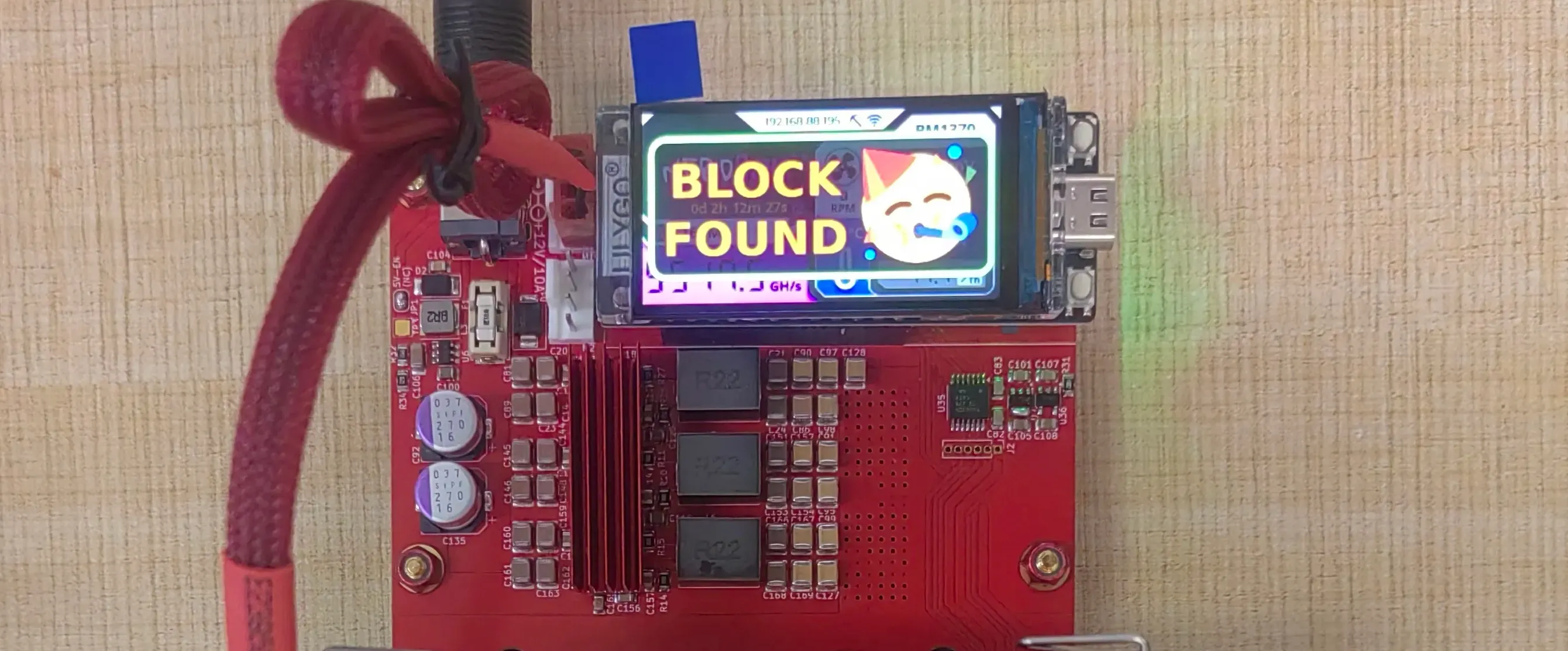
In about 1 week (from the day after April Fool's Day, April 2, 2026, to April 9), four Bitcoin solo miners consecutively mined blocks! Miners directly and fully receive the entire block reward (approx. 3.125 BTC) + transaction fees, with the average individual earnings from these block discoveries exceeding $200,000. Two of them were Nerd Miners, indicating the winning probability of Nerd Miner is constantly increasing!!!
View details of NerdQaxe++'s first 3 confirmed block wins, the miracle of 4 blocks in 1 week!!!


comments