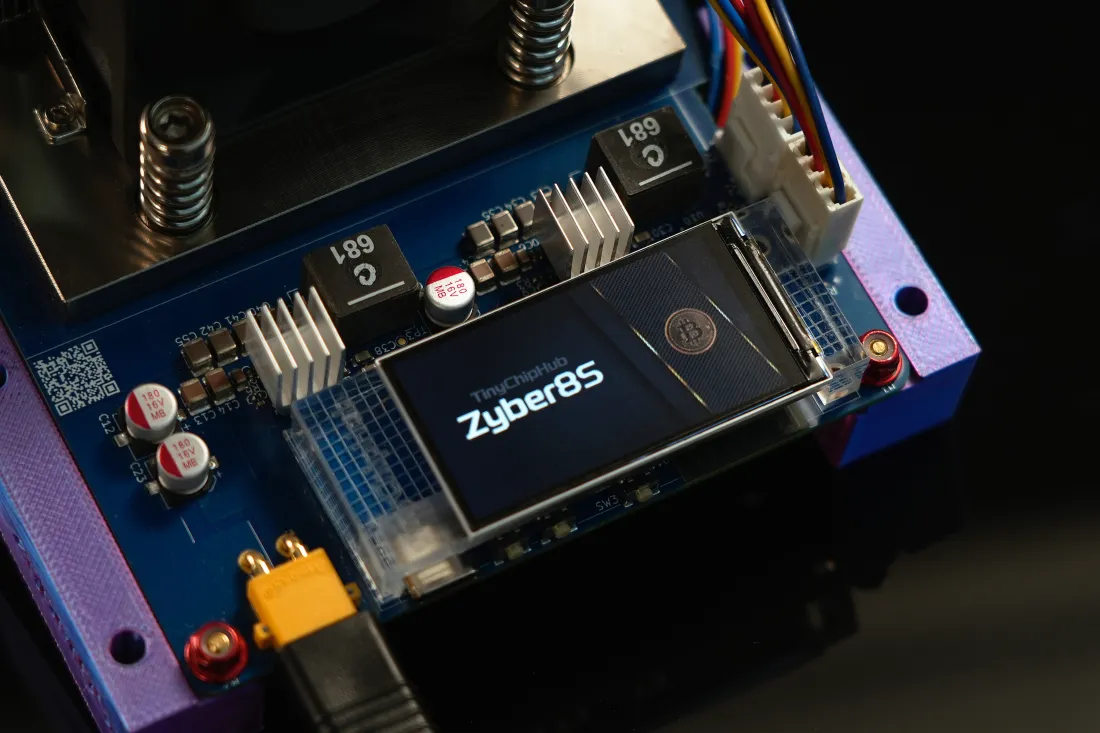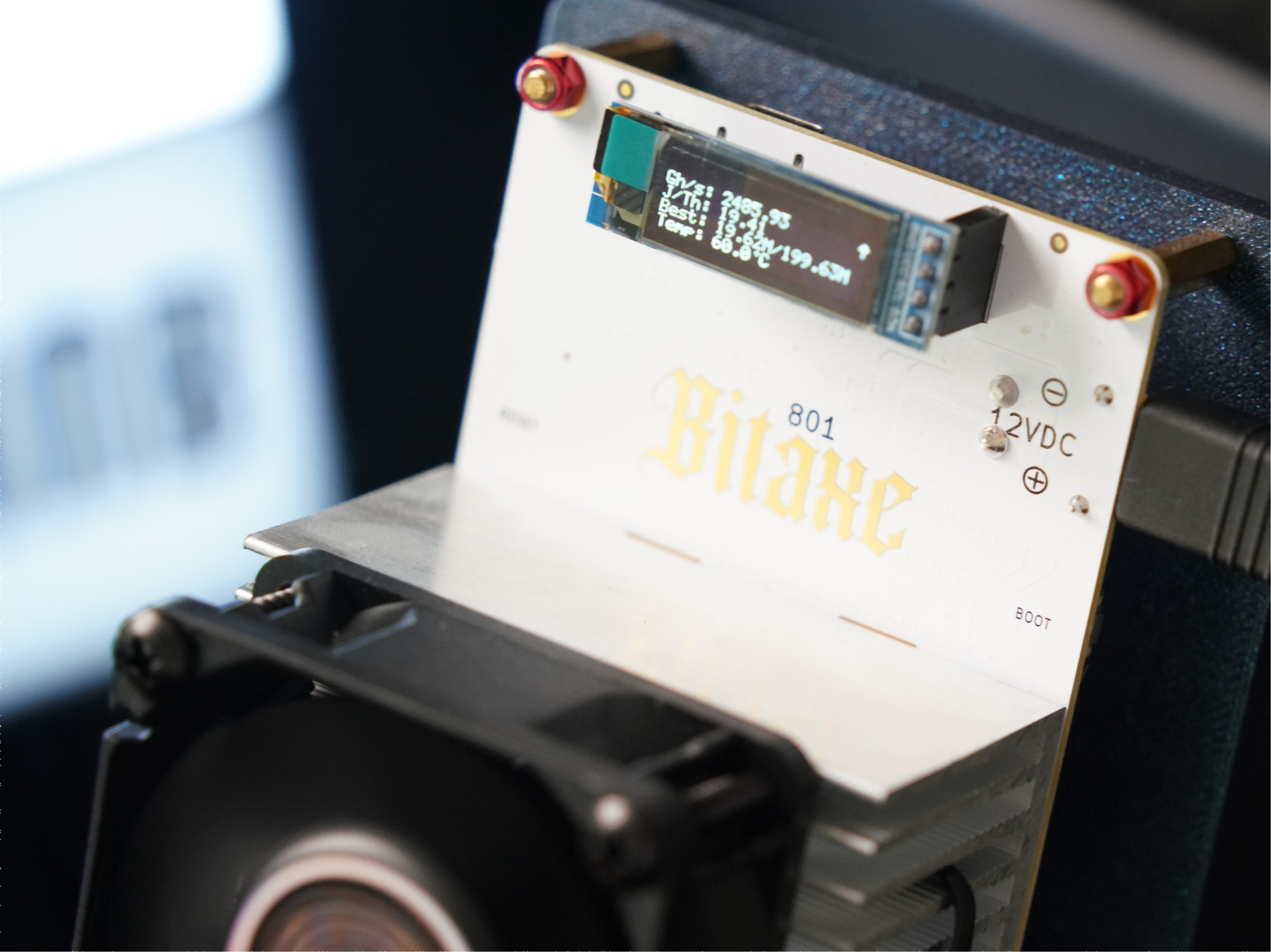
After testing this TinyChipHub-built BitAxe GT 801 for over 48 hours straight ! 2× BM1370 chips stable at 2.58 TH/s, the AxeOS dashboard shows an average of 2.55 TH/s, efficiency at 20.98 J/TH, and power draw at 53W. This is a true desktop-class home miner you can actually leave running 7×24 on your desk. But this week, I got my hands on the Zyber Blanc sample unit based on a single BM1373 3nm chip, all 8 hashrate domains online, each pushing 287~308 GH/s. One chip doing the work of two? This is my real-world comparison. Let's start with the Bitaxe GT 801.
1. Why Bitaxe GT Still Matters in 2026
First, an overclocking case study: YouTuber Ryan Blass (Karpuz Mining channel) pushed a single-fan Bitaxe GT prototype to a staggering 4.27 TH/s peak with efficiency holding at 12.27 J/TH (see the data at 5:25 in the video below). That absolutely crushes the official 2.4+ TH/s spec. What does this prove? The Bitaxe GT's hardware design headroom is absurdly generous factory parameters are extremely conservative.
But that's not the only reason. The Bitaxe GT 801 remains relevant and wildly popular in 2026 for two core reasons:
- It's the most mature open-source 2.4 TH/s-class device in the ecosystem. AxeOS firmware is community-maintained at bitaxe.org, the ESP32-S3 Wi-Fi module lets you check your hashrate curve right from your phone, and add-ons like a Noctua NF-A6x25 keep noise under 40 dB — quieter than your fridge.
- It serves as the reference baseline for the new BM1373 single-core era. The upcoming Nexus S1 Miner crams 4× BM1373 chips for ≥10 TH/s default. You can't meaningfully compare that to a dual-BM1370 Bitaxe GT unless you use something like the Nerdqaxe++ — but the Zyber Blanc single-core unit is coming, directly targeting the same 2.4–2.5 TH/s bracket. Problem solved!
In North America and Western Europe in 2026, the solo miner population is expanding fast. Why? Solo blocks are landing with increasing frequency — just look at that insane week where 4 blocks were found by solo miners alone.
- 🔥 Open-Source Firmware (AxeOS): Community-kept alive, one-click OC tuning!
- ❄️ Dual-fan cooling upgrade path: <40 dB acoustic profile, literally inaudible at night~~
- 🏃 True plug-and-play: 12V @15A XT30 interface with lab-grade optimized PSU.
- 💪 Dual BM1370 architecture: Two 5nm-optimized dies in parallel — the best price/performance choice until BM1373 arrived!
But the Bitaxe GT has a hard physical ceiling. Even if you overclock those two BM1370 chips till they smoke, the silicon lifespan is what it is. Ryan Blass touched 4.27 TH/s briefly with aggressive cooling and a prototype board, but daily stable operation lives at ~2.4 TH/s, with 19 J/TH being the sweet spot. That's exactly why, when I saw the BM1373 data sheet, my first reaction wasn't "woah it's powerful" — it was "finally, we broke through the efficiency-per-die / single-core limit bottleneck."
2. BitAxe GT 801: Design & Build & Overclocked
2.1 Hardware Design Philosophy
The design logic of the Bitaxe GT 801 is crystal clear: double up on the Bitaxe Gamma formula, wrapping industrial-grade PCB engineering in a consumer-friendly package.
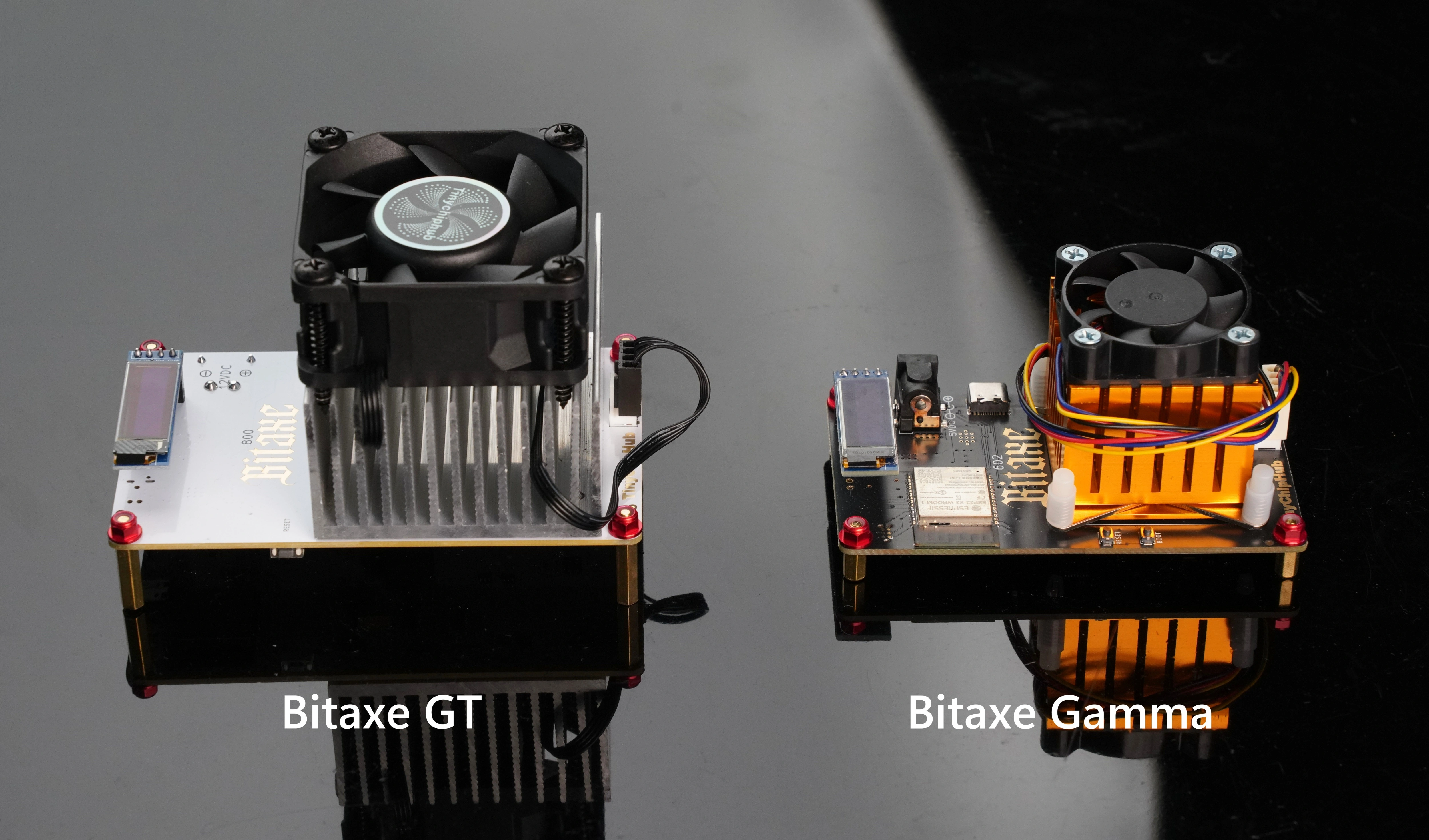
The GT 801's PCB is a reinforced 6-layer board built to carry two BM1370 ASICs — and these aren't random chips. They're the same dies found on the Antminer S21 Pro, Bitmain's flagship miner, soldered onto a palm-sized white dev board. Each BM1370 is rated ~1.2 TH/s; two of them give a theoretical 2.4 TH/s peak, so at stock frequency you get 2.4+ TH/s real output.
.webp?w=5000&h=2812)
But the hardest-core part isn't just the chips — it's the board that carries them. 6-layer PCB + 1oz thick copper + full-aluminum heatsink + bracket-reinforced fans is what gives the GT the headroom to even attempt 4.27 TH/s. And that was just the single-fan version. With iterative engineering, the retail units from TinyChipHub now ship with the dual-fan revision. What does that mean? Read on.
2.1.1 Bitaxe GT (801) Hardware Design Highlights
Key Point 1: 6-Layer PCB + 1oz Copper Thickness
Stepping up from the Gamma's 4-layer to a 6-layer PCB. The extra layers aren't just for thermal dissipation — they're for cleaner power distribution and signal integrity. Meanwhile, bumping copper weight from 0.5oz → 1oz roughly doubles the cross-sectional area, giving an estimated 1.4–1.6× (+40% to +60%) effective lateral thermal spreading that kills local hot spots before they become a problem.
Key Point 2: Widened chassis (60→70mm) + Full Aluminum Heatsink
That extra 10mm of board width accommodates the extruded aluminum fin-stack heatsink. More surface area = the ~43W of heat at stock settings gets dissipated fast enough that core temps never spiral.
Key Point 3: Front-mounted 12V 6025 intake fan
The 12V 6025 upfront does the heavy lifting. At 5000 RPM it pushes 27.4 CFM straight through the dual-chip fin stack, pinning junction temp to ≤60°C — the safety line.
Key Point 4: Lucky anti-vibration bracket + rear 8010 exhaust fan
The dual-fan GT adds these two items. The rear 8010 needs only 3000 RPM for 26.53 CFM, and thanks to the silicone dampers, acoustic output stays at a genuinely low ~34 dBA — rivaling Noctua-tier silence.
Key Point 5: 5V single-chip rail → 12V XT30 dual-chip supply
At the same wattage, stepping from 5V to 12V drops current to 5/12 (~42%) of the original value. That slashes I²R (joule) losses across the input cable, connector, and PCB traces. The XT30 connector's low contact resistance means even when you spike to 3+ TH/s, power delivery stays safe.
2.2 Building the Bitaxe GT 801
2.2.1 Unboxing Checklist
Before touching anything, lay everything from the TCH team's packaging out on the table — most guides skip this step. The Bitaxe GT 801 kit from TinyChipHub contains:
| Item | Quantity | Notes |
|---|---|---|
| Bitaxe GT 801 main unit | 1 | Front 6025 fan pre-installed |
| 12V-15A lab-optimized PSU + XT30 power cable | 1 | Plug type auto-matched to shipping address (US/EU/UK/CN), connects to the board's XT30 port |
| Lucky anti-vibration bracket + rear 8010 fan + Y-splitter | 1 set | The optional 2nd fan assembly, EVA-foam wrapped separately — don't miss it |
| Bitcoin commemorative coin | 1 | TCH team's bonus surprise 😄 |
Note: The AC plug is matched to the country you entered at checkout. If you need something special, note it in the order comments. The 8010 fan + Y-splitter usually sit in an EVA foam pouch in the accessory compartment — check carefully.
2.2.2 Hardware Assembly + AxeOS Setup (Dual-Fan Version Assembly Flow)
The single-fan version is plug-and-play. The dual-fan version needs the vibration bracket installed first. The disassembly/assembly video (TinyChipHub YouTube) walks through the full process — core steps below:
Step 1: Mount the Lucky Anti-Vibration Bracket
Attach the rear 8010 fan to the bracket — airflow direction matters: the intake side should face toward the outside of the host. This is the #1 mistake 90% of new solo miners make. Silicone grommets go in the bracket corners; align the whole assembly with the screw holes at the board's tail end; tighten with a screwdriver.
Step 2: Connect Fan Power
Both the front 6025 and rear 8010 use 4-pin fan headers. The board has one FAN header on the top edge; the second bracket fan gets a Y-splitter (included). Before plugging in, confirm orientation — the 4-pin has a guide tab. Forcing it backwards can damage the header.
⚠️ Airflow direction: Front 6025 blows into the heatsink (positive-pressure cooling). Rear 8010 pulls exhaust air away from the PCB side (auxiliary convection). Both airflow vectors should point toward the PCB. Compared to single-fan, cooling efficiency roughly doubles.
Step 3: Connect XT30 Power
Insert the XT30 connector into the board's right-side power jack — it needs a firm push to seat fully. One more check: make sure no fan wires are pinched between the fan and the board before closing it up. Once assembled and powered on, the Bitaxe broadcasts its own Wi-Fi hotspot.
Step 4: Connect to the Miner's Wi-Fi Hotspot
On your phone or laptop, find a Wi-Fi SSID like bitaxe in the network list. Connect, then open a browser and navigate to http://192.168.xxx.xxx to land on the AxeOS config page.
💡 Can't connect? Make sure it's powered and the LED is on. The ESP32-S3 takes ~30 sec to init after power-up — wait for the light, then scan again.
Step 5: Configure Wi-Fi Uplink
In AxeOS, go to NetWork, enter your home Wi-Fi SSID + password, click Save. The device reboots onto your LAN and the AP hotspot closes. Find its IP from your router's client list (or an IP scanner), then browse to that IP for the AxeOS dashboard.
📱 iOS / Android shortcut: Same Wi-Fi → browser → http://192.168.xxx.xxx → AxeOS dashboard.
Step 6: Configure Your Pool
In the AxeOS main dashboard, go to Pool → Pool Configuration and fill in:
Stratum Host: Recommended — registration-free solo pool (e.g. public-pool.io)
Stratum Port: corresponding port
Stratum User: label / worker name, e.g. Bitaxe-GT-801
Stratum Password: (set a password)
The backup pool is your fallback if the primary fails. Use the same wallet address for both pools, but with different pool endpoints / ports / protocols.
Why public-pool.io is the top pick? It's a solo-only transparent pool — zero fees, fully verifiable transactions, accepts any hashrate scale. Latency is consistently lower than legacy pools, perfect for small home ASICs.
Step 7: Dial in Initial Run Parameters (Optional Tuning)
Factory defaults: 525 MHz / 1.15V — ultra-conservative. If ambient is 22–25°C and cooling is mounted correctly, bump frequency in +25 MHz increments in Settings. Let it run 24 hrs per step; if HW Error rate stays <2%, keep pushing. On this unit I landed at 625 MHz / 1.20V and it holds temperature beautifully, hashrate reading 2.58 TH/s.
2.2.3 Bitaxe GT Disassembly & Reassembly Walkthrough (Step-by-Step Video)
A lot of people think "assembling a miner" is just tightening screws. On a Bitaxe GT, especially the heatsink mounting phase, it's precision work. This video takes you through the full teardown and rebuild — hopefully a solid reference for anyone maintaining their own unit.
2.3 Hashrate & Power: Stock vs. Overclocked
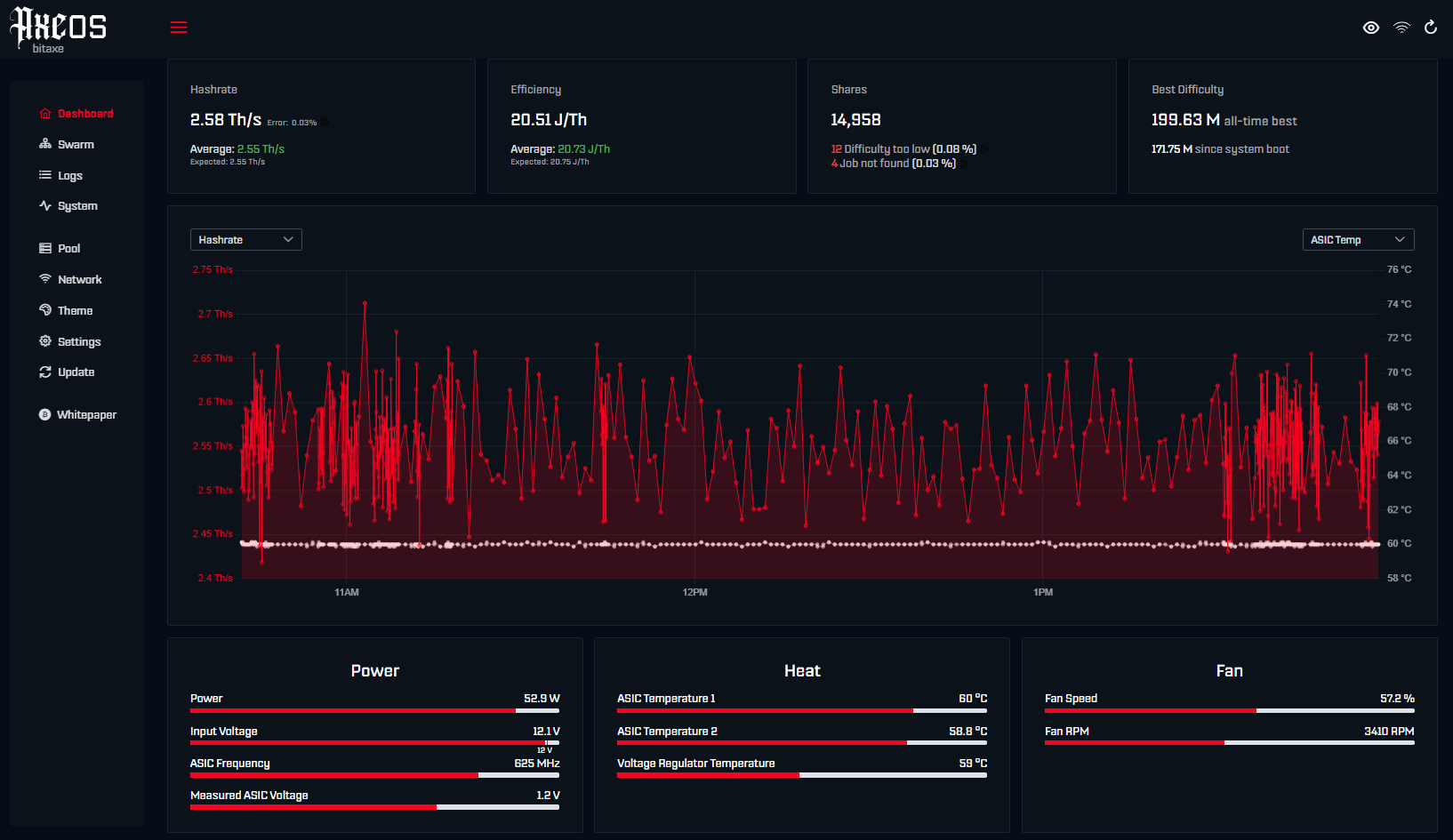
From my AxeOS screenshot above live status: Hashrate 2.58 TH/s (variance ±0.3%), Efficiency 20.51 J/TH, ASIC Temp 1: 60°C / Temp 2: 58.8°C, Fan Speed 57.2% @ 3410 RPM. These numbers are from a continuous 48-hour run at 24–26°C ambient. Power reads 52.9 W actual draw, Input Voltage steady at 12.1V, ASIC Frequency at 625 MHz. VRM temp is 60°C — the entire system is running in a very healthy thermal window. Looking at Ryan Blass's extreme data, there's still fan headroom left. The GT 801 has room to breathe!
| Parameter | Stock (Default) | Overclocked (Daily Stable) | Ryan Blass Extreme Limit |
|---|---|---|---|
| Peak Hashrate | 2.4+ TH/s | 2.71 TH/s | 4.27 TH/s 🔥 |
| Power Draw | 42 W | 52.9 W | ~50W (est.) |
| Efficiency | ~19 J/TH | ~20.51 J/TH | 12.27 J/TH (transient) |
| ASIC Frequency | 525 MHz | 625 MHz | 700 MHz |
| ASIC Voltage | 1.15 V | 1.20 V | 1.20 V |
| Fan Noise | ~36 dB | ~36 dB | ~40 dB |
Overclocking is, at its core, trading silicon lifespan for hashrate — but on the GT 801, the math is weirdly favorable. At stock-ish 625 MHz / 1.20V, both BM1370s output ~2.71 TH/s peaks, sipping ~53W. Efficiency around 20.51 J/TH — perfectly viable for 7×24 daily operation. And remember, the BM1370 was designed to survive inside an Antminer S21 Pro at much higher frequencies. There's margin baked in.
My OC progression, for reference:
- Step 1: 525 MHz / 1.15V → ~2.4 TH/s, ~40W. Boot test, verify stability.
- Step 2: 550 MHz / 1.15V → 2.4+ TH/s, ~45W. Push further, watch for HW errors.
- Step 3: 625 MHz / 1.20V → 2.55 TH/s avg, 52.8W → my daily driver setting ✅
- Step 4 (extreme only): 700 MHz / 1.20V → expected ~2.86 TH/s, peak touched 4.27 TH/s — not for daily use, benchmark/demo only 🔥
In his Karpuz Mining video, Ryan Blass's single-fan prototype hit 4.27 TH/s peak with efficiency dipping to 12.27 J/TH — transient, yes, but even the sustained figure was 2.7+ TH/s. Makes sense: optimized power delivery + serious cooling fully unleashed the BM1370's buried potential. Check his other solo miner upgrade videos for context.
But the reality check: 4.27 TH/s is a peak, not a sustainable daily number. In continuous runtime, 2.4–2.71 TH/s is the real-world bracket. What that test does prove is the GT platform's massive hardware headroom. Look at the red oscillation curve in the screenshot — hashrate dancing between 2.4↔2.7 TH/s is normal behavior, inherent to SHA-256 mining. The white moving average line hugging 60°C tells the real story: thermal equilibrium is solid, dual-die load balancing is working.
⚠️ Watch for: Temp spikes >65°C — usually means ambient rose, or something's misreporting/failing. Bitaxe GT error rates are generally low, but heat is the enemy.
3. Buy the Bitaxe GT Now, or Wait for BM1373?
I've been asked this twenty-plus times across X (Twitter), Facebook, Discord, Reddit… The answer depends entirely on what you value. If you want "in-hand today, plug in and it works, full community support," the Bitaxe GT 801 is buyable right now at 199–289 depending on config. If you're chasing "next-gen efficiency标杆, willing to ride out lead times," or just want to be among the first with a 3nm chip on your desk — the BM1373-line Zyber Blanc deserves your attention.
But Ryan's 4.27 TH/s test added a twist: the GT isn't just "last-gen" — it's a generation whose OC potential was severely underestimated. If you enjoy tweaking, the GT's ROI might surprise you. Just respect the thermal budget — 4.27 TH/s won't happen with the stock fan alone. And ironically, the biggest headache with BM1373 right now is also cooling, which is why Zyber Blanc's launch slipped 1–2 weeks — they've apparently just nailed the thermal solution.
| Dimension | BitAxe GT 801 (High Value / Reference Machine) | Zyber Blanc (Pre-launch, Worth Watching) |
|---|---|---|
| Chip | Dual BM1370 (5nm, refined) | Single BM1373 (3nm) |
| Hashrate | 2.4 TH/s (daily) / 4.27 TH/s (benchmark peak) | 2.5 TH/s (minimum expected) |
| Efficiency | ~17–22 J/TH (daily) | < 10 J/TH (expected) |
| Power | 40–53 W (daily) | 20–25 W (expected) |
| Noise | 36–40 dB | TBD |
| Availability | ✅ In stock, ships now | ⏳ Announced, pre-order / first batch soon |
| Firmware | AxeOS — open-source community | Zyber OS — new UI, pending public release |
| Price Range | 199 – 289 | Expected under $300/unit, with more surprises on the roadmap |
Here's what most people miss: the open-source ecosystem IS the Bitaxe GT's invisible moat. Anything that goes wrong — Wi-Fi won't connect, OC params are off, you bricked the firmware flash — someone in the community has already hit it. Issue response time is typically within 24 hours. And it's not just about firmware.
Open-source means you own the device completely — from bare-metal code to the web UI. It's like buying a car and getting the engine tune files and full blueprints in the same box. Audit the code for backdoors. Tune params to your exact environment. The hardware ages in real time, but the software doesn't — because the community keeps pulling it forward.
Closed-source means the vendor handles diagnostics for you — easier, truer plug-and-play, better for beginners! Some newer miners go closed-first-then-open later specifically to prevent counterfeits and clone garbage from poisoning the community waters. My take? If you already have a rig running, adding a GT as #2 to the hash pool makes total sense — and it doubles as the perfect BM1373 reference baseline so you can actually measure generational gain.
If this is your first entry under 100–300, the GT is currently the highest fault-tolerance choice. And don't forget — TCH's box includes the lab-grade 12V-15A PSU, the enhanced fan bracket… and that Bitcoin commemorative coin. Unboxing feels like cracking a tech mystery box 🎁. As for Zyber Blanc? Keep eyes on. New chassis, new hardware layout, new OS — wait for the launch reviews, then decide ➡️.
4. BM1373 > 2× BM1370 Chips: Less Power, More Done
This might sound like marketing hype. The data doesn't lie. The BM1373 is Bitmain's newest 3nm SHA-256 ASIC — single-die rated ~2.5 TH/s at ~10 J/TH (possibly 9.5 J/TH under liquid cooling).
Compare: the GT 801 needs two BM1370s just to cross the 2.4 TH/s threshold, burning 19–22 J/TH to do it. One BM1373 beats two BM1370s on both raw hashrate and efficiency. This isn't an iteration. It's a generational leap.
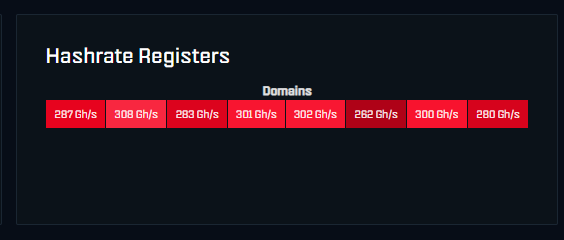
From the Zyber Blanc engineering sample I have on my bench — the critical detail: all 8 Hashrate Register Domains active and healthy:
- Domain 1: 287 GH/s
- Domain 2: 308 GH/s
- Domain 3: 283 GH/s
- Domain 4: 301 GH/s
- Domain 5: 302 GH/s
- Domain 6: 282 GH/s
- Domain 7: 300 GH/s
- Domain 8: 280 GH/s
8 domains ≈ 2.44 TH/s total — that's the real-time readout from a single BM1373 die at default, 8 parallel hash engines summing their output. Each domain = one independent hashing slice; 8-way parallelism is how BM1373 hits 2.5 TH/s. Versus the GT's dual-die / 4-domain scheme, BM1373 gets 8 domains inside ONE die to match or exceed the same throughput 🔥. But before comparing whole machines, let's break down the two chips themselves.
4.1 What Is the BM1370 ASIC Chip?
The BM1370 is Bitmain's high-efficiency SHA-256 ASIC, purpose-built for Bitcoin mining. It uses Bitmain's latest (5nm variant) process and has been the backbone of both enterprise fleets and the personal solo miner scene across 2024–2025.
Core Specs at a Glance
- Hashrate: ~1.0–1.4 TH/s per chip (model & thermal dependent)
- Efficiency: ~15 J/TH (≈15 joules per terahash)
- Per-chip power: ~15–18 W
- Architecture: 4 Hash Domains in parallel, single-die package, relatively cool running
Primary Application Scenarios
- Enterprise miner core: Flagship rigs like Antminer S21 Pro, S21+, S21XP, and S21XP Hydro all use BM1370 as their compute engine.
- Miner repair / replacement parts: Widely used as hash-board swap components for large-scale fleet maintenance.
- Solo home miner powerplant: Thanks to its low per-chip draw of ~18–20W, it's the beating heart of the Bitaxe Gamma / Gamma Turbo, NerdQaxe++ Miner, Zyber 8G, and similar home units.
Put simply: BM1370 is the maturity and stability benchmark of the current solo miner circle. 2024 enterprise silicon, 2025 repurposed into home desktops — and that ~1.2 TH/s per chip already made plenty of miners' heads turn. But it's fundamentally a 5nm-era product. Its opponent? The BM1373. 3nm.
4.2 What Is the BM1373 ASIC Chip?
Quick reality check before we dive — you'll see the question floating around: "BM1373 can't exist before the Antminer S23 launches, right?" Social media response to that: some S21-series variants were already mapped onto the BM1373 architecture path, and limited inventory has quietly started circulating. That's essentially accurate. BM1373 channels initially existed only inside select crypto-mining OEM circles, used strictly for next-gen R&D and competitive benchmarking.
As of now, BM1373 supply has broadened considerably. TinyChipHub holds a batch of high-grade BM1373 dies — part of them allocated to the Zyber Blanc build, the rest available for sale. We currently support bulk reservations (10–50 chips per batch) for manufacturers or individual miners who know what they're doing.
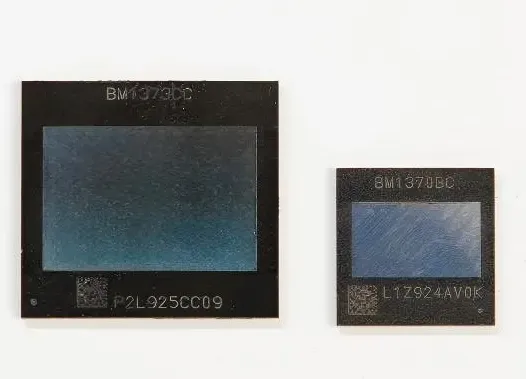
The BM1373 is Bitmain's next-generation ASIC, built on an advanced 3nm process and optimized exclusively for SHA-256 (Bitcoin). It derives from the Antminer S23-series board core design, engineered to shatter the ceilings that constrained Bitaxe / Nerdqaxe / Zyber and other solo miners. Compared to its predecessor BM1370, energy efficiency jumps by ~33% — arguably making it the most competitive single-miner chip of 2026. For the deep dive, check the BM1373 ASIC Chip Analysis Article. Quick summary:
Three numbers define BM1373: 3nm · 2.5+ TH/s · 10 J/TH. This is Bitmain's S23 Hyd technology trickling down to the garage tinkerer — imagine dropping a supercar motor into a kit car.
- 3nm process: The current ceiling for BTC-miner ASIC lithography. Shrinking from 5nm→3nm means faster switching, drastically lower leakage current.
- ~2.5 TH/s: 2.5 trillion hash attempts per second — you'd need roughly 2,500 RTX 4090s working in parallel to match what this one chip does.
- ~10 J/TH: Only 10 joules burned for every trillion hashes. Smaller number = more efficient.
🔥 Real-World Thought Experiment: Say you build a multi-chip unit with 4× BM1373 (think the recently leaked Nexus S1 Solo Miner):
- Total hashrate ≈ 4 × 2.5 TH/s = 10+ TH/s
- Expected total draw ≈ 10 TH/s × 10 J/TH = ~100W
That essentially matches a standard Zyber 8G (8× BM1370) for hashrate — but power drops from ~180W → ~100W. 44% energy saved, 4 fewer failure points. That said, early Nexus S1 test figures show draws closer to 140W (and some configs pushing 12 TH/s at 160W!), meaning it's still hovering around Zyber 8G Premium's territory — suggesting BM1373 still has early-stage stability quirks. Fair to say: watch this space. More teardowns incoming.
4.3 ASIC Chip Showdown: BM1366 → BM1373…
A lot of people assume chip upgrades are like iPhone "tick-tock" — incremental at best. BM1373 vs. the old guard isn't tick-tock. Going 5nm → 3nm is a powerplant revolution.
The most common misconception: "Newer chip = bigger hashrate number. That's it." Dead wrong. For a home miner, efficiency (J/TH) and thermal behavior matter infinitely more than peak TH/s — because you don't have an industrial cooling plant or 3-phase power.
The real progress boils down to two things: less electricity per hash, and more hashes per square millimeter. 3nm jams exponentially more transistors into the same footprint. Heat generation drops. Your heatsink actually stands a chance.
Four Generations of SHA-256 ASICs Side-by-Side
(Data sourced from: What is BM1373 ASIC Chip? Stronger Solo Miner)
| Parameter | BM1366 | BM1368 | BM1370 | BM1373 |
|---|---|---|---|---|
| Process | 5nm | 5nm (Antminer S21 gen) | Bitmain FinFET (5nm variant) | 3nm |
| Per-Chip Hashrate | 400–500 GH/s (0.4–0.5 TH/s) | 500–700 GH/s (0.5–0.7 TH/s) | ~1.2 TH/s | ~2.5 TH/s |
| Per-Chip Power | ~12W | ~12–18W | ~15–18W (est., from 1.2 TH/s @ ~15 J/TH) | ~25W |
| Efficiency (J/TH) | ~27 J/TH | ~17.5 J/TH | ~15 J/TH | ~10 J/TH |
| Found In | Bitaxe Ultra / Hex | Bitaxe Supra / Supra Hex, Zyber 8S | Bitaxe Gamma / GT, NerdQaxe++, Zyber 8G | Zyber Blanc, Nexus S1… |
For solo miners, the chip is only half the equation — firmware compatibility is the other half. BM1373 is compelling because it performs — but PCB integration, voltage regulation, and firmware bring-up are still real friction points.
➡️ But notice the payoff: BM1370 → BM1373 = 2× hashrate, yet ~33% less energy per hash (J/TH)! Meaning: generating the same output, waste heat drops proportionally. 3nm lets the core voltage sag lower; the die runs "cooler by design." The early teething issues will smooth out with time. Upgrading isn't about flexing specs — it's about wielding more hashrate with less physical and thermal penalty.
The deeper implication: Fewer chips = fewer failure points = lower mean power consumption. The GT's dual-chip layout means two power rails, two thermal loops, two signal chains. Zyber Blanc's single-die approach collapses all of that into one clean path. For a home desk? Reliability usually beats peak benchmarks. ❄️
5. Bitaxe Gamma Turbo vs. Zyber Blanc (First Edition)
Putting these two side-by-side might seem odd — one's a refined Bitaxe Gamma Turbo, the other's a BM1373 newcomer. But they actually represent the two polar design philosophies of the home miner world: one chases dead-silent living-room operation; the other chases efficiency-per-watt absolutism. Once you understand that fork, you know exactly which camp you belong to.
Bitaxe Gamma Turbo has a crystal-clear brief: for people who keep their miner in the bedroom or living room. Passive散热 + twin fans hold noise to 36 dB — basically ambient background hum. The trade-off? OC headroom stays modest (~2.3–2.8 TH/s), because thermal limits are the hard constraint. It's not the fastest. It won't match a Zyber 8G or Nexus S1's 10 TH/s bravado. But you'll literally forget it's running.
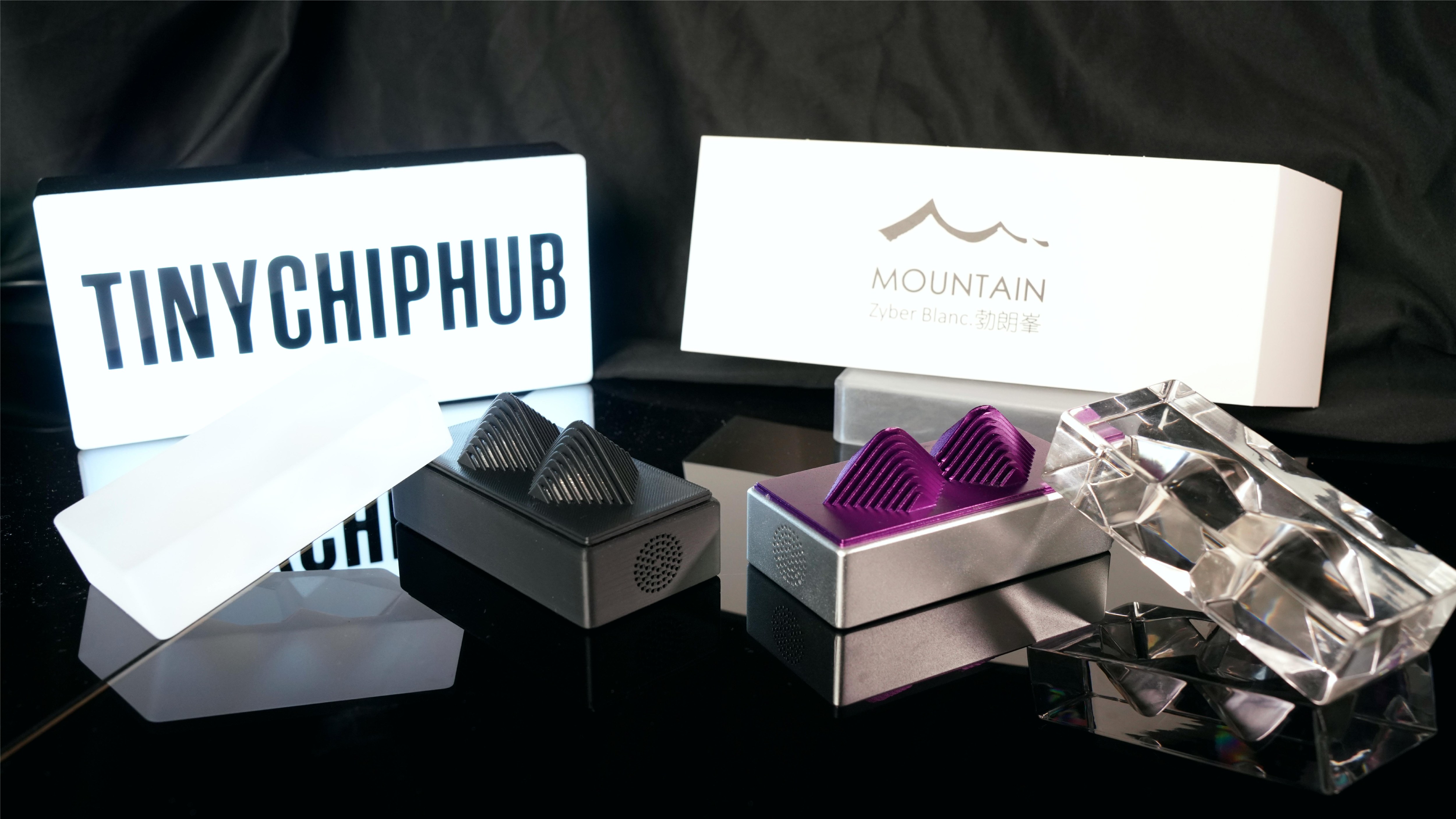
Zyber Blanc (First Edition) goes the opposite route: stuff the newest 3nm die into the smallest possible chassis, use active airflow to milk every watt of performance. From my sample-unit telemetry, 2.5 TH/s @ ~25W @ ~10 J/TH — that's top-tier efficiency at literally any scale. Here's the kicker: Zyber Blanc's absolute power draw is LOWER than the GT's (25W vs 42W), yet its ceiling is HIGHER. That's the 3nm dividend — same math done with fewer transistor leaks, so the energy bill shrinks.
Which one?
- Noise-sensitive environment → Bitaxe Gamma Turbo
- Rock-solid daily stability → Bitaxe Gamma Turbo
- Raw efficiency & cutting-edge experimentation → Zyber Blanc
- Hardcore tinkerer / early adopter → Zyber Blanc
They aren't replacements for each other — they're answers to different questions. Stacking Zyber Blanc against the scene-dominating Bitaxe GT makes the generational gap obvious: the GT's dual-BM1370 brute-force approach clings to ~20 J/TH, while Blanc's single BM1373 nearly halves that to <10 J/TH at the same hashrate tier. Zyber Blanc isn't just a hashrate play — it's a "how little can I pay the power company for 2.5 TH/s" play. Desktop aesthetics + bitcoin decentralization nerdery in one box.
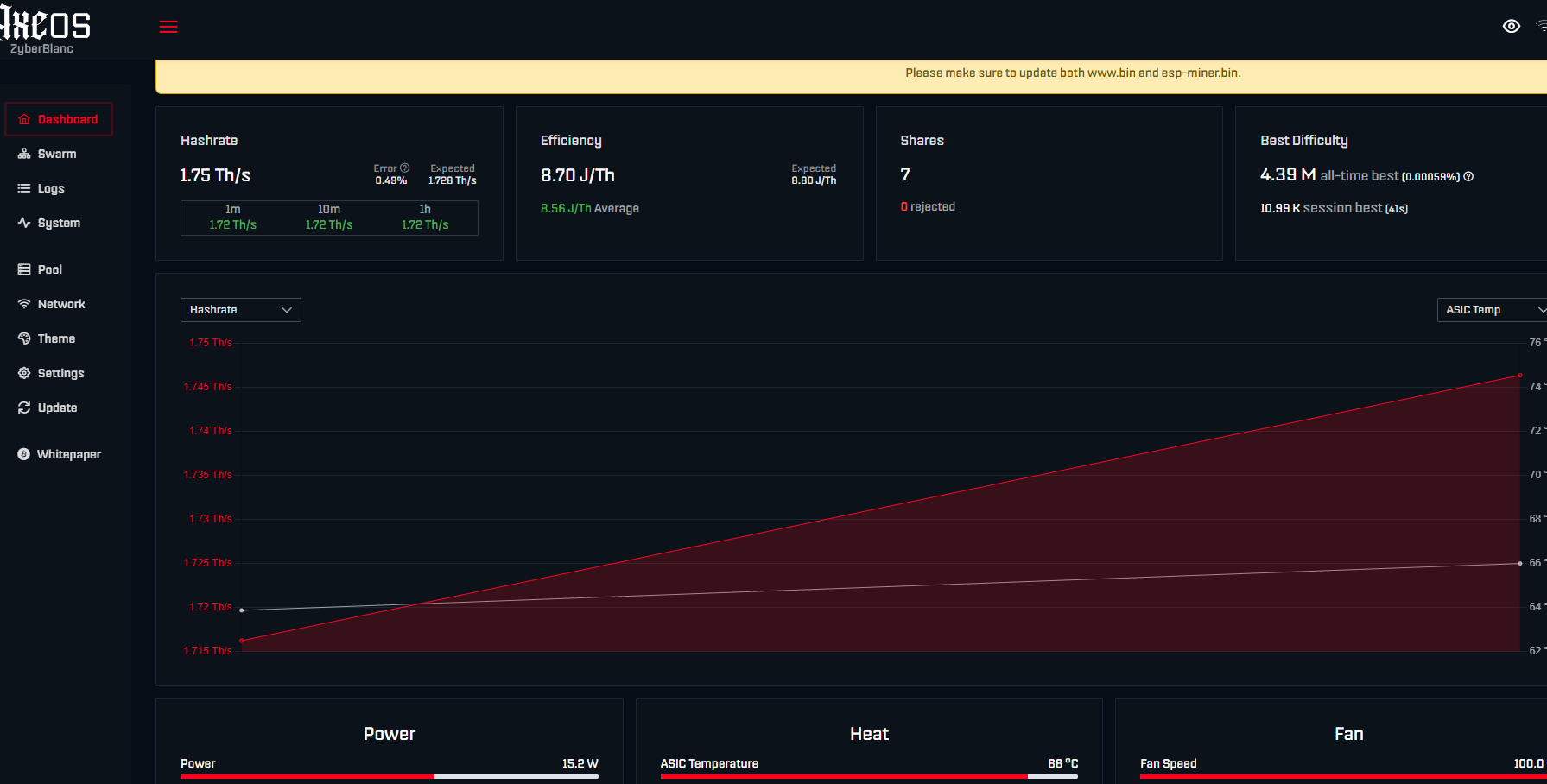
This is the Zyber Blanc First Edition sample I currently have on the bench — the AxeOS backend shot is from last week's session. It's still running through the AxeOS transition layer before migrating fully to Zyber OS. As what's effectively the world's first single-core BM1373 solo miner, it pulled 8.70 J/TH measured efficiency (avg 8.56 J/TH) at just 15.2W system draw. Early days still, but it already proves the BM1373's solo-mining potential is very real.
These AxeOS shots are a snapshot from last week — just the appetizer. According to TCH engineers, Zyber OS (their in-house OS) wrapped development this week. Moving off the generic AxeOS means they can deep-optimize for BM1373's voltage/frequency curves, unlock finer-grained power management, custom solo strategies, and a UI that actually feels like a "high-performance computing collectible" rather than a dev-board web portal. For anyone into Bitcoin decentralization and bare-silicon tinkering, Zyber Blanc + Zyber OS is arguably the most anticipated consumer mining hardware iteration of the year.