💡 Tip: The following article data is for reference only. Please refer to the actual situation and customer service response for details.
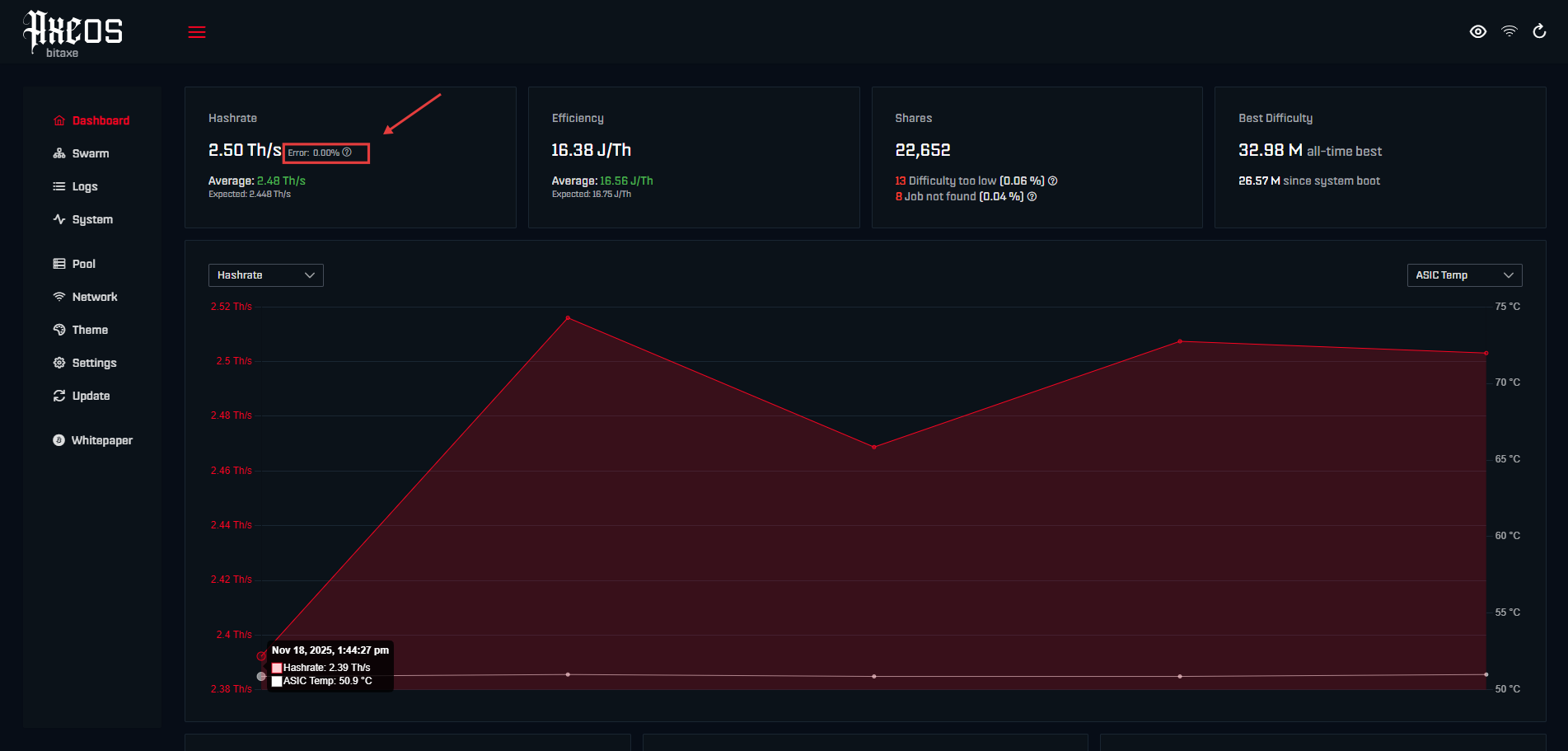
The Hash Rate Error on a Bitaxe miner is a metric of hash rate accuracy reported by the ASIC chip's internal registers, representing the percentage of invalid calculations out of the total hash rate.For a normally running Bitaxe Gamma with TCH factory configuration,0% to 2%, its error rate should generally stay within.
The ESP-Miner firmware reads two hardware registers, 0x8C and 0x4C, on the chip every 5 seconds, dividing the erroneous hash rate by the current hash rate to get the percentage. For example, with a 1200 GH/s hash rate and a 12 GH/s error rate, the error rate would be 1.0%. The healthy range is 0-2%; exceeding 5% means the chip is running beyond its stability limit and requires frequency reduction or voltage adjustment. Below, we will completely break down this metric, covering the source of errors, calculation logic, normal ranges, diagnostics, and fixes.
⚠️Common Point of Confusion❌️: The Hash Rate Error metric reports internal chip errors and is completely different from "rejected shares" (which are caused by network latency or pool connection issues)!
Where Hash Rate Error Comes From🔍
This number is not a rejection rate given by the pool, nor is it your Wi-Fi disconnecting. It comes from the silicon die of the Bitmain ASIC chip inside the Bitaxe Miner—specifically the BM1366, BM1368, BM1370, or BM1397. When the chip is running SHA-256 calculations, transistor states flip incorrectly during certain clock cycles, resulting in wasted hashes. The register records this faithfully. Essentially, this is a matter of semiconductor physics and has no relation to the network.
Key Takeaways:
- ❄️ Hash Rate Error ≠ Rejected Shares: Rejected shares are a network metric on the pool side, occurring after the ASIC calculation is complete;
- ❄️ Hash Rate Error ≠ Connection Errors: A disconnected Wi-Fi only affects share submission, not the internal calculations of the chip;
- ❄️ Hash Rate Error = Chip-level Accuracy Measurement: Directly reflects the calculation accuracy of the silicon die under current operating conditions;
Origin of This Feature
The hash rate register reading functionality in ESP-Miner was developed by developer Mutatrum over several iterations. Developer WantClue wrote the hash rate register statistics initialization code (PR #1263, merged into v2.11.0) to handle special cases where certain ASIC chip versions do not expose error registers in the same way.
According to the ESP-Miner v2.11.0 (or later) release notes, this update ensures that the firmware correctly initializes statistics when hash rate registers are unavailable, preventing display errors on older or unsupported chip versions. If you are running a firmware version prior to v2.11.0 (or later), you may not see the error percentage at all, or the displayed data may be inaccurate. Please update your firmware to the latest stable version to use this feature. TinyChipHub has organized the firmware updates for Bitaxe, Nerdqaxe, Zyber, and other series of miners here.
How to Calculate📊
The ESP-Miner firmware polls and reads two hardware registers on the ASIC chip every 5 seconds via the ASIC_read_registers() function. After converting the two raw values into equivalent GH/s hash rates, the firmware uses Error Hash Rate ÷ Current Hash Rate × 100 to calculate the percentage. The formula itself is not complicated, but understanding this conversion process is key to knowing what the numbers on your AxeOS dashboard mean.
Two Core Registers
- Register 0x8C (REGISTER_TOTAL_COUNT): Counts the total number of SHA-256 hashes calculated by the ASIC since the last read cycle (i.e., counts the total computational load).
- Register 0x4C (REGISTER_ERROR_COUNT): Counts the number of hashing errors that occurred during the same period (counts the erroneous computational load).
The firmware converts the values of both registers into equivalent hash rates (in GH/s) and then uses the following formula to calculate the error percentage:
error_percentage = (error_hashrate / current_hashrate) × 100
💪 You can also programmatically monitor this via the AxeOS REST API endpoint GET /api/system/info. The returned hashrateMonitor object contains total hash rate, domains hash rate for each core domain, and errorCount for cumulative errors. Polling this periodically to calculate the delta gives you the real-time error rate.
The response contains an object structured as follows:
"hashrateMonitor": {
"asics": [{
"total": 1072.24,
"domains": [273.58, 276.21, 268.49, 252.19],
"errorCount": 1415
}]
}
📶Normal Expected Range
Factory parameters vary significantly across different chip models. These factory values have been verified by the TinyChipHub team through actual testing; under a 25°C room temperature and good cooling conditions, the error rate typically stays between 0.5%-1.5%. The IEEE semiconductor reliability standard (JEDEC JESD22-A108) requires a functional error rate of no more than 1% for ASICs under rated operating conditions, but 2% is perfectly acceptable in overclocking scenarios.
- BM1370 ASIC Chip (Bitaxe Gamma, Bitaxe GT): Factory frequency 490-525 MHz, voltage 1150-1200 mV;
- BM1368 ASIC Chip (Bitaxe Supra, Bitaxe Supra Hex): Factory frequency 490 MHz, voltage 1150 mV;
- BM1366 ASIC Chip (Bitaxe Ultra, Bitaxe Hex): Factory frequency 485 MHz, voltage 1150 mV.
0%-2% is the ideal normal range; reaching 5% is considered high. An error rate below 2% indicates the chip is running comfortably within its designed parameters, requiring no action. Many devices can even achieve an error rate close to 0% after proper tuning. 2%-5% is a gray area; it might be due to instability after overclocking. It is recommended to observe the trend, as it is generally acceptable but usually indicates the chip is running near the edge of its stable range. Exceeding 5% requires immediate action—do not "wait and see if it fixes itself." It is best to reduce the frequency immediately if you want to ensure your solo miner runs stably 24/7.
Referring to the example we mentioned at the beginning, for a Bitaxe Gamma tested and shipped by the TinyChipHub team, under a normal hash rate of 1200 GH/s, the erroneous hash rate generally does not exceed 60 GH/s; otherwise, the error rate will be >5.0%. This could indicate an issue with the chip or other components. Please lower the frequency immediately and send the background logs to customer service on any platform (common platforms include official website email, Discord, X, Facebook, etc.). Our team will prioritize resolving the issue for you upon seeing it.
Error Rate Reference Table
| Hash Rate (GH/s) | Error Hash Rate (GH/s) | Error Rate | Status |
|---|---|---|---|
| 1200 | 12 | 1.0% | ✅ Healthy Operation |
| 1200 | 36 | 3.0% | ⚠️ Needs Attention |
| 1200 | 60 | 5.0% | 🔴 Chip Stability Limit |
❓ Some say, "My Bitaxe has a 0% error rate, is that too low? Is something wrong?"! Don't worry. A 0% error rate means your chip's silicon quality is excellent, and all calculations are correct under the current operating conditions. That's a good thing. However, if you overclock to 575 MHz and still get 0%, it means there is still room to push further. Based on our testing standards, increase the frequency by 25 MHz each time until an error rate appears.
High Error Rate! Diagnosis & Repair🛠️
If the error rate spikes, check these four common causes in order: Frequency too high → Voltage too low → Overheating → Insufficient or degrading power supply capacity. 90% of high error rate issues stem from the first two. The most straightforward fix is to reset to factory settings and then slowly re-tune, increasing the frequency by 25 MHz each time and waiting 15 minutes to observe the error rate, finding the sweet spot for your specific chip.
5 Steps to Help You Find the Root Cause of High Hash Rate Error
- 🏃 Step 1 Check ASIC Temperature: Open the AxeOS dashboard at
<your-bitaxe-ip>and check the ASIC temperature. If it exceeds 70°C, resolve the cooling issue first. Check the fan speed (RPM is displayed on the dashboard) and ensure the heatsink is securely attached. AxeOS will automatically throttle for thermal protection above 75°C, but errors can spike before throttling kicks in. - 🏃Step 2 Record Background Info: Go to the Settings page of the AxeOS dashboard and record the Frequency (MHz), Core Voltage (mV), and Fan Speed under the current high error rate conditions.
- 🏃Step 3 Reset to Factory Settings: Reset it to factory parameters and run it for 15-30 minutes. If the error rate drops to 0-2%, it confirms the overclocking parameters were the issue. When re-tuning, increase the frequency by only 25 MHz at a time, waiting 15 minutes between adjustments.
- 🏃Step 4 Check the Power Supply: Check the input voltage displayed in the AxeOS system info. For 5V models, a voltage drop below 4.8V under load indicates a power supply voltage sag. For 12V models, check if the voltage is below 11.5V. If voltage droop is detected, try replacing the power supply. Currently, any solo miner sold by the TCH team comes with a matched experimental-grade power supply, making this issue relatively rare. If the voltage continues to drop, you may need to lower your overclocking settings or upgrade your power supply. You can also contact TinyChipHub's backend customer support for assistance in diagnosing the issue.
- 🏃Step 5 Update Firmware: Check your firmware version. ESP-Miner v2.11.0 improved the hash rate register handling logic, and even higher versions like v2.13.0 fixed bugs in earlier firmware that could misread registers and falsely report high error rates. In 2025, a Bitaxe community user reported their error rate dropped from 6.2% to 1.8% simply by updating to v2.13.0, proving the high reading was purely a firmware bug.

Not all ASIC chips perform the same. Due to natural variations in the semiconductor manufacturing process (the so-called "silicon lottery"), two BM1370 chips made on the same wafer can have different maximum stable frequencies, let alone future chips like the BM1373 Solo Miner——Zyber Blanc. One chip might run at 600MHz with only a 1% error rate, while another chip with identical specs from the same batch might have a 4% error rate at that same frequency.
This is why the error percentage is such a valuable tuning tool. It directly measures the stability limit of your specific chip, showing you exactly where its boundaries lie. Instead of following a fixed overclocking guide, use the error percentage as your guide: gradually increase the frequency until the error exceeds 2%, then back it down by 25 MHz. That is your chip's optimal operating frequency. (Note: The latest BM1373 ASIC chips are relatively more powerful, so this metric might be affected differently.)
💡Quick Question: Does the hash rate error affect my chances of finding a block?
Yes, but only indirectly. The error rate represents wasted computation: hashes that the ASIC attempted but failed to calculate correctly. These invalid hashes do not count towards the probability of finding a valid nonce. If your error rate is 5%, your effective hash rate (the hashes that actually contribute to your chances of finding a block) is 5% lower than what is displayed on your dashboard. The impact of a low error rate (0% to 2%) is negligible. However, if the error rate exceeds 10%, it means you are wasting 10% of your hash rate for nothing.